Chatbot Meeting Scheduler That Qualifies Leads

Use a chatbot meeting scheduler to qualify leads before they book. Wonderchat collects visitor info first, then delivers the calendar link directly in chat.

Trusted by businesses worldwide

Easy 5 minute set-up

How Wonderchat Works
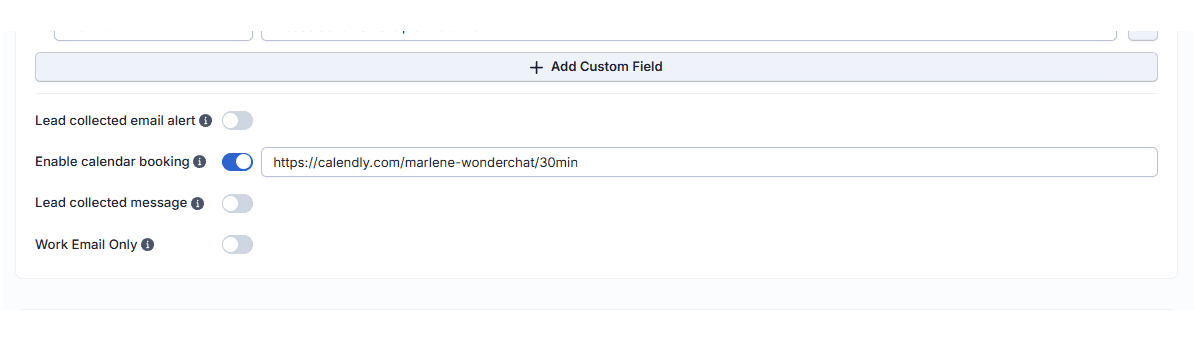
Enable Calendar Booking in Chatbot

One toggle to activate in-chat scheduling

Inside the chatbot editor, the Lead Collection settings include a dedicated Enable Calendar Booking toggle. Switch it on, paste your scheduling link, and save. Your chatbot instantly becomes a meeting scheduler with no additional configuration required.

One-click activation

Paste any scheduling link

Live immediately after saving
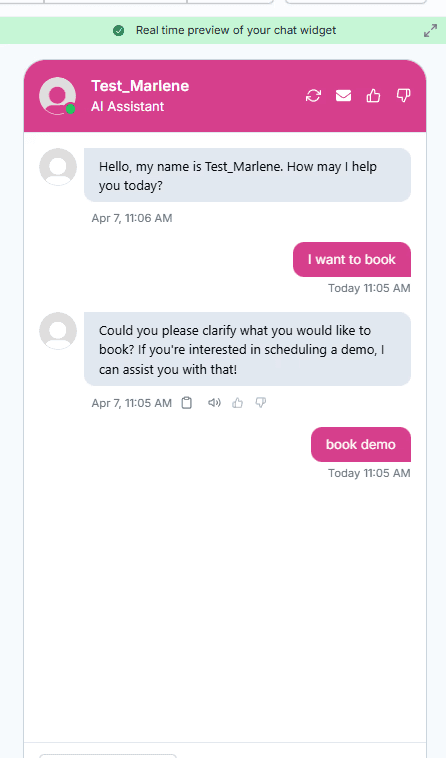
Smart Meeting Scheduler Trigger

Surface the booking prompt at the right moment

Control exactly when the scheduling option appears. Set it to trigger automatically after a set number of messages, or activate it when a visitor uses a specific phrase like 'I want to book a call.' The calendar link surfaces only when intent is highest.

Trigger by message count

Trigger by visitor phrase

Intent-based scheduling prompts
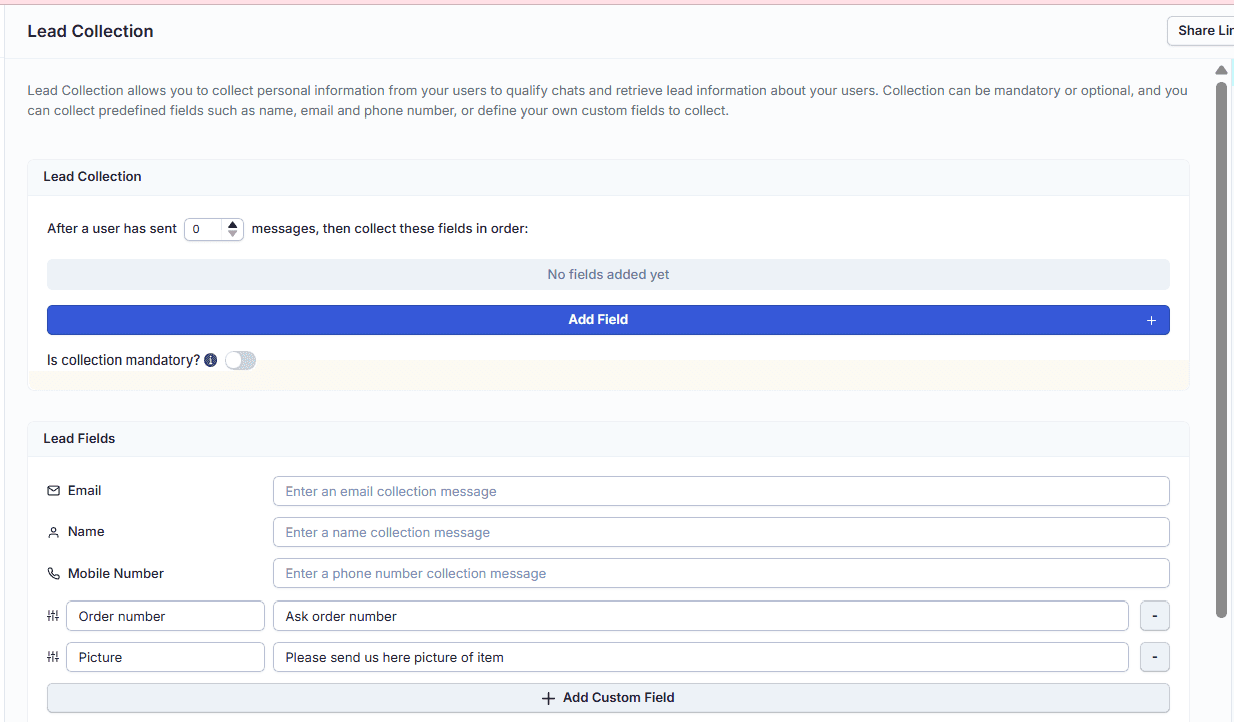
Lead Qualification Before Booking

Collect lead info before showing the calendar

Before the calendar link appears, the chatbot collects the fields you configure — name, email, company, and more. Every meeting booked through Wonderchat arrives with full visitor context, so your team walks into every call prepared.

Configurable qualifying fields

Context attached to every booking

No cold or incomplete meetings

5-minute set up with our native integration

Set Up Your Live Chat Alternative in Minutes

1

Create your AI chatbot – Pick the perfect AI model fit for your support needs.

2

Train AI with Docs, FAQs & Policies – Upload knowledge base files and site links.

3

Customise Workflows & Escalation Rules – AI handles what it can, and escalates what it can’t.

4

Monitor & Optimise with Analytics – See where customers get stuck and fine-tune responses.
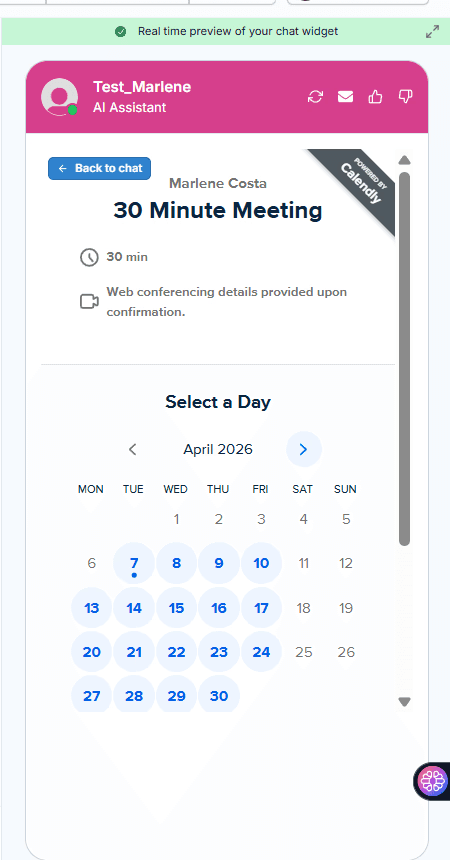
In-Chat Calendar Booking Experience

Visitors book without ever leaving the chat

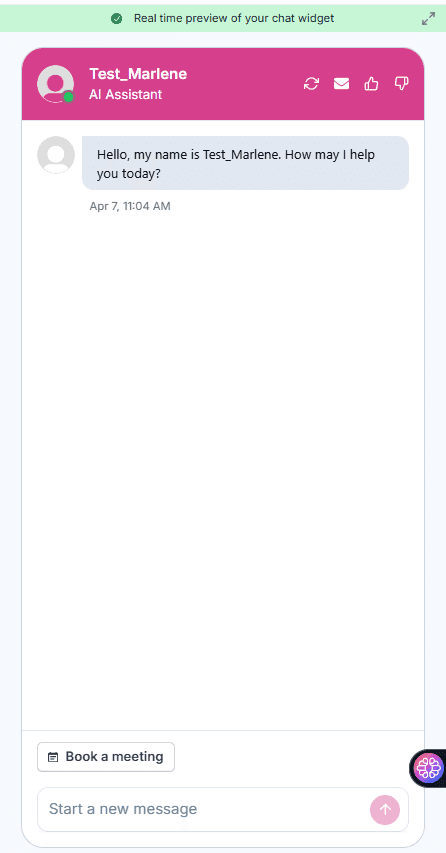
When triggered, the chatbot delivers a Book a Meeting button and the scheduling link inline within the conversation. Visitors book directly inside the chat widget with zero context switching and zero drop-off from navigating away.

Booking link delivered in chat

Zero page redirects

Friction-free visitor experience
End-to-End Scheduling in Seconds

From first message to confirmed meeting instantly

The complete flow from visitor message to confirmed booking takes seconds. A visitor says they want to book a call, the chatbot recognizes the trigger phrase, and the calendar link is delivered immediately. The entire scheduling experience is automated and conversational.

Instant trigger recognition

Automated end-to-end flow

No human intervention needed

Testimonials

Businesses with successful customer service start

with Wonderchat

Testimonials

Businesses with successful customer service start

with Wonderchat

Industry Grade Compliance

Wonderchat is GDPR compliant and AICPA SOC 2 Certified.

Industry Grade Compliance

Wonderchat is GDPR compliant and AICPA SOC 2 Certified.

FAQ

How does a chatbot meeting scheduler work in Wonderchat?

Wonderchat's chatbot meeting scheduler is built into the Lead Collection settings of the chatbot editor. You enable a Calendar Booking toggle, paste your scheduling link, and configure when the prompt should appear. The chatbot then handles the entire flow: collecting visitor information, detecting booking intent, and delivering the calendar link directly inside the chat conversation.

Can the chatbot qualify leads before showing the booking link?

Yes. Before surfacing the calendar link, the chatbot collects the fields you configure — such as name, email, and company. This ensures every meeting that gets booked comes with qualifying context attached. Your team arrives at every call informed rather than starting cold.

What triggers the meeting scheduler inside the chatbot?

You can configure two trigger modes. The first automatically surfaces the booking prompt after a set number of messages. The second activates when a visitor uses a specific phrase, such as 'I want to book a call.' This means the scheduling prompt appears at moments of genuine intent rather than interrupting the conversation at random.

Does the visitor have to leave the chat to book a meeting?

No. When the chatbot delivers the scheduling link, it appears inline within the chat widget as a Book a Meeting button. Visitors can complete their booking without navigating away from the page or switching to another tab, which reduces drop-off and keeps the experience seamless.

Which scheduling tools are compatible with Wonderchat's chatbot?

Wonderchat works by accepting a scheduling link that you paste into the Calendar Booking settings. Calendly is one example of a supported tool. As long as your scheduling platform provides a bookable link, it can be integrated into the chatbot flow.

FAQ

How does a chatbot meeting scheduler work in Wonderchat?

Wonderchat's chatbot meeting scheduler is built into the Lead Collection settings of the chatbot editor. You enable a Calendar Booking toggle, paste your scheduling link, and configure when the prompt should appear. The chatbot then handles the entire flow: collecting visitor information, detecting booking intent, and delivering the calendar link directly inside the chat conversation.

Can the chatbot qualify leads before showing the booking link?

Yes. Before surfacing the calendar link, the chatbot collects the fields you configure — such as name, email, and company. This ensures every meeting that gets booked comes with qualifying context attached. Your team arrives at every call informed rather than starting cold.

What triggers the meeting scheduler inside the chatbot?

You can configure two trigger modes. The first automatically surfaces the booking prompt after a set number of messages. The second activates when a visitor uses a specific phrase, such as 'I want to book a call.' This means the scheduling prompt appears at moments of genuine intent rather than interrupting the conversation at random.

Does the visitor have to leave the chat to book a meeting?

No. When the chatbot delivers the scheduling link, it appears inline within the chat widget as a Book a Meeting button. Visitors can complete their booking without navigating away from the page or switching to another tab, which reduces drop-off and keeps the experience seamless.

Which scheduling tools are compatible with Wonderchat's chatbot?

Wonderchat works by accepting a scheduling link that you paste into the Calendar Booking settings. Calendly is one example of a supported tool. As long as your scheduling platform provides a bookable link, it can be integrated into the chatbot flow.

40+ Languages

Starts at $0.02/message

Available 24/7

AI agents that service your customers end-to-end

14-day free trial. No credit card required

40+ Languages

Starts at $0.02/message

Available 24/7

Schedule Meetings With Your Chatbot

14-day free trial. No credit card required









