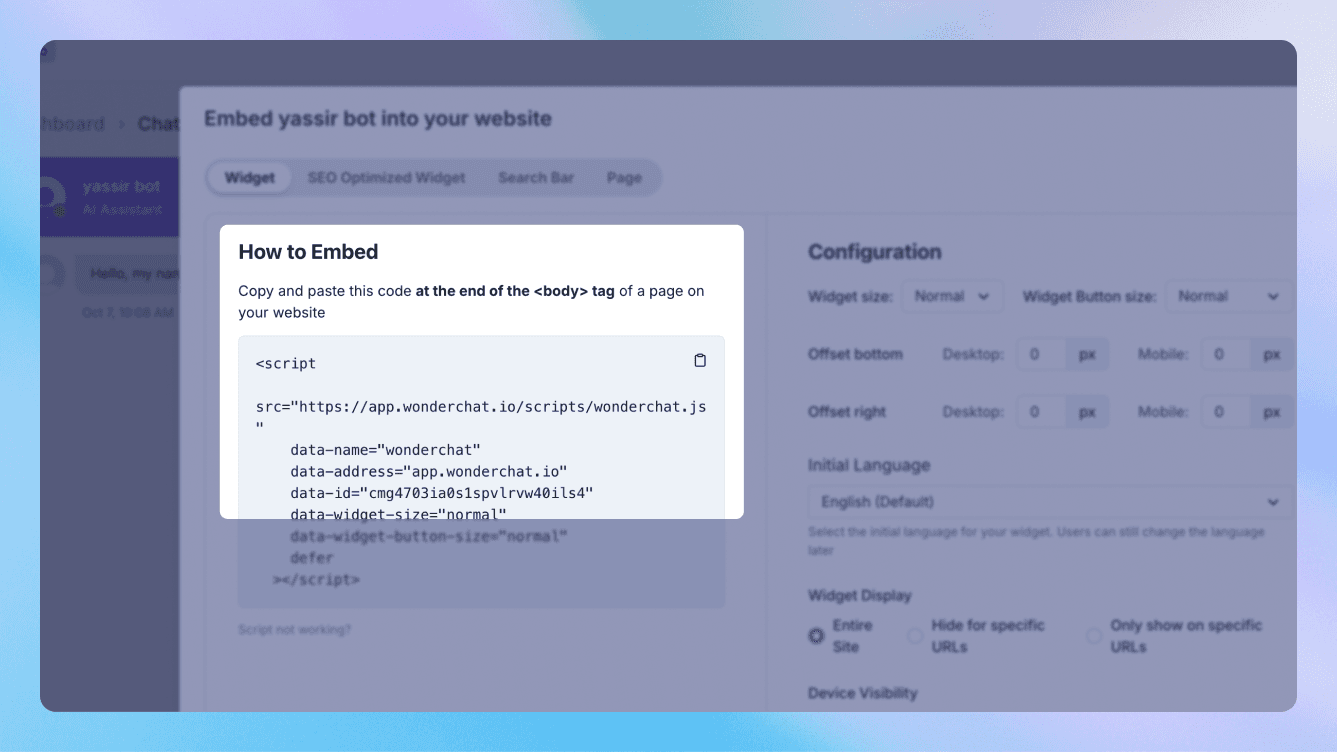
Getting an AI agent live shouldn't require a developer sprint. Wonderchat gives you a single snippet of code - you paste it into your site, and the agent is live. That's the whole install.
It works everywhere: Framer, Webflow, WordPress, Shopify, and hand-coded sites alike. Drop the snippet in, and the chat widget appears, already trained on whatever content you've connected. There's no plugin to maintain, no rebuild, no waiting on engineering to schedule the work. Someone non-technical can have the agent on the site in the time it takes to copy and paste.
From there it's the full grounded agent - answering from your content, citing sources, handling support or capturing leads - just delivered through a widget you added in a minute. And you control how it looks and where it sits on each page, so it reads as part of your site rather than something bolted on after the fact. Change the content it's trained on, and the live widget updates without touching the snippet again.
The point is to remove the last piece of friction between deciding to use an AI agent and actually having one running. It's part of a SOC 2 Type II certified, GDPR-compliant platform. Copy one line, paste it into your site, and you're live.
FAQ
How do I add an AI chat widget to my website?
Paste one snippet of code into your site and the agent is live - no plugin, no rebuild, no developer required.
Which website builders does it work with?
Do I need a developer to embed it?
See it answer your hardest question — from your own docs.
One agent for support and sales, trained on your content, ready in minutes.