
Quick Summary
The best AI Slack bots in 2026 are Wonderchat, Slack AI, Agentforce, Claude, Cohere, ClearFeed and Albus. Wonderchat fits teams that want answers from their own documents with no code and a free plan that refills 50 AI replies every month; Slack AI fits thread summaries; Agentforce fits Salesforce teams; ClearFeed fits ticketing inside Slack.
Looking for the Right AI Chatbot for Your Slack Channel?
Slack is where many teams do their work communication, and it has become a productivity hub for hybrid teams. Teams add an AI chatbot to Slack so people can ask a question in a channel and get the answer from company docs, instead of tagging the colleague who always knows.
This Wonderchat guide explains what Slack does, how AI chatbots add to it, and where third-party tools like Wonderchat fit. Then it ranks the best AI Slack chatbots by features and value.
Why Listen to Wonderchat?
Wonderchat builds AI agents for customer service and internal support, including a Slack integration, and Wonderchat’s customer stories show how teams use them. Wonderchat analysed 5,848,078 conversations across 14,318 businesses between March 2023 and August 2026.
This guide uses that experience to help you choose the right tool for your team's Slack.
What Is Slack? (Explained for Beginners)
Slack is a business messaging application that helps teams communicate and collaborate in real-time. Think of it as a smarter, faster alternative to email, designed for modern and remote team collaboration.
Slack goes beyond simple chat by organizing conversations into channels for specific teams, topics, or projects. It keeps discussions clean using threads and offers built-in tools for file sharing, search, and custom workflows.
Slack has become a central hub for modern work. According to Slack, it is used by nearly 80% of the Fortune 100, and it integrates with tools from Google Drive to Zoom.
That’s why AI chatbots belong in Slack. An agent in Slack answers where the question gets asked, so nobody has to leave the channel to find it.
What Are AI Chatbots for Slack?
AI chatbots for Slack are bots that answer questions and run simple tasks inside Slack channels and DMs. They answer the questions your team asks over and over, from the documents you already have. These chatbots can:
Answer FAQs across teams
Summarize threads and channels
Search internal documents and knowledge bases
Automate repetitive tasks
Integrate with CRMs to pull up customer records
There are two main types of Slack bots:
Built-in Slack AI bots: Limited to searching and summarizing data within your workspace, offering passive assistance.
Third-party Slack bots (e.g. Wonderchat): Answers from the company documents and wikis you connect, shows the source on every reply, and hands over to a person when it can't find the answer. They give specific answers from your own content, not just summaries of what is already in Slack.
Why Use Third-Party AI Chatbots in Slack?
Here’s why many teams choose tools like Wonderchat over Slack’s native AI features:
Works with Your Content
Your agent can answer from the company wikis, SOPs, help docs, PDFs, and website content you connect. When a question comes up in Slack, the answer is company-specific and cites the document. Watch the archive, though: Wonderchat's support team finds that the failure seen most often is not invention. It is retrieval pulling an archived policy and answering from it correctly: the citation is real, but the policy is out of date.
Answers With the Source Shown
With an agent that answers from your docs, your team gets the answer and the page it came from, instead of tagging a colleague. No more waiting or repeatedly tagging colleagues for answers.
Easier than Training Staff
Instead of hunting down information, employees simply ask the Slack chatbot, which delivers answers in seconds.
Fewer Repeat Questions
The same questions land on the same few people over and over. An agent in Slack answers them from the docs, so the person who wrote the docs stops being the help desk.
Integration
Unlike Slack's native AI, third-party tools like Wonderchat answer from content outside Slack, such as your website, help center, files and Google Drive. The same agent can also answer on your website, by email and in WhatsApp, with the same answer in every channel.
Top 7 AI Chatbots for Slack in 2026
Here’s a side-by-side comparison of the seven AI chatbots for Slack covered in this guide:
Chatbot | Key features | Major use case | Native to Slack | Best For | Rank |
|---|---|---|---|---|---|
Wonderchat | No-code setup, custom training on docs, sourced answers | Answering team questions from your docs | No (Slack app) | Small B2B teams with real docs, support teams | 1 |
Slack AI (Native) | Smart thread summaries, AI search, daily recaps | Enhancing Slack productivity with built-in tools | Yes | Sales, enterprise-level teams | 2 |
Agentforce by Salesforce | Salesforce integration, customizable agents, contextual responses | Sales automation, CRM-based support | No | Sales, enterprise-level teams | 3 |
Claude by Anthropic | Advanced NLP, safety-focused design, document analysis | General-purpose AI, brainstorming, and document summarization | No | Teams needing ethical AI for content creation | 4 |
Cohere AI | Document-based answers, retrieval-augmented generation (RAG) | Document management, internal knowledge sharing | No | Global teams, document-heavy workflows | 5 |
ClearFeed | Multi-channel support, automated query resolution, SLA alerts | Helpdesk automation, IT and HR support | Yes | Customer support teams, IT departments | 6 |
Albus | Cross-platform search, customizable knowledge base | Knowledge management, information retrieval | No | Teams needing quick access to internal docs | 7 |
The ranking weighs value for small and mid-sized teams. Wonderchat ranks first on price and setup, not on enterprise depth, where Agentforce and Slack AI lead.
Looking for customer automation tools outside of Slack instead? Wonderchat also reviewed the Top Customer Support Automation Tools for personalized interactions.
Now to the full review.
1. Wonderchat: Flat-Priced Answers for Slack Teams
If you want an affordable AI agent that answers inside Slack, start with Wonderchat.

Wonderchat builds no-code AI agents that answer from your own docs and work inside Slack, suited to startups, agencies, support teams and growing businesses.
With Wonderchat, teams answer questions instantly in Slack without the enterprise price tag. You can train your AI agents on custom content, including PDFs, help docs, and websites. The agent then answers directly in Slack, in either DMs or channels, with the source shown.
Key Features
Custom training: Train agents on your own content, like PDFs and webpages, for tailored responses.
Slack integration: Chat directly with your agent via DMs or channels, making it easy to get answers within your workspace.
Secure data: SOC 2 Type II, GDPR, EU-hosted in Frankfurt, HIPAA BAA available.
Quick setup: 80% of Wonderchat agents that go live do so the same day, with no coding needed.
Pricing
Wonderchat’s Free plan includes 50 AI replies a month, refilled monthly, with no card. Seats cost $0 on every plan, and live chat is on every plan, Free included. Paid plans include:
Starter: 500 AI replies a month.
Basic: 3,000 AI replies a month, live chat, HubSpot contact sync and the analytics dashboard.
Scale: 9,000 AI replies a month, SharePoint, weekly auto-recrawl and AI lead scoring.
Enterprise: Custom pricing.
Pros
No-code setup, perfect for teams without technical expertise
Flat pricing metered by AI replies, with no per-seat fee
Customizable and scalable with easy integration into Slack
Shows the source on every answer
Cons
Needs ongoing content upkeep to stay accurate
Not a Slack-native ticketing tool: tickets with the full chat live in Wonderchat's help desk, or it hands over into Zendesk or Freshdesk, while ClearFeed runs tickets inside Slack
2. Slack AI (Native)
Slack’s native AI is built to enhance productivity by providing intelligent summaries, searches, and recaps directly within your workspace.

It summarizes threads and searches messages, files and channels, so people catch up without reading everything.
Key Features
Smart thread summaries: Automatically generates key highlights from long threads, saving time for users to catch up on essential discussions.
AI search: Helps users find specific messages, files, or mentions across Slack with more accuracy, saving time and improving response times.
Daily recaps: Provides a summary of key conversations from the day, helping users stay informed without sifting through entire threads.
Pricing
AI features are included in paid Slack plans; see Slack’s website for current prices.
Pros
Slack integration, no extra app installations needed
Enhanced productivity without leaving Slack
Works on data already inside your Slack workspace
Cons
Built around what is already in Slack, not answers from your published help docs
Per-user Slack pricing adds up for larger teams
Limited advanced capabilities beyond basic functions
3. Agentforce by Salesforce
Built by Salesforce, Agentforce tightly integrates with Salesforce CRM and other platforms like Asana and Box. For enterprise sales and support teams already on Salesforce, it is the strongest fit inside Slack.

Agentforce pulls customer records to provide tailored, AI-driven responses based on history. It supports sales queries, manages meetings, and automates backend tasks for better team efficiency.
Key Features
Salesforce Integration: Direct access to customer records, enhancing conversations and decision-making.
Customizable agents: Build and deploy agents tailored to specific roles, such as IT support, HR assistance, or sales coaching.
Contextual awareness: Agents use unstructured conversational data within Slack, along with connected enterprise data, to provide relevant and timely responses.
Pricing
Agentforce uses consumption-based pricing, charged per action or per conversation; check Salesforce’s pricing page for current rates.
All plans include access to resources and the Trailblazer community.
Pros
Automation of routine sales and support tasks
Enhanced productivity with multi-platform support
Fully scalable for enterprise-level teams
Cons
Can be complex to set up without Salesforce expertise
Pricing can be high for small teams or startups relative to other options
Limited functionality outside of Salesforce-focused workflows
4. Claude by Anthropic
Claude is a general-purpose AI chatbot designed by Anthropic, known for its long context window and safety-focused design. It integrates with Slack, offering a powerful solution for teams needing assistance with brainstorming, document analysis, and content creation.

Claude helps streamline workflows by providing intelligent responses and insights directly within your Slack workspace.
Key Features
Workflow automation: Advanced NLP for drafting messages, answering requests, analyzing/summarizing docs and spreadsheets.
Safety-first design: Built to reduce biased or inappropriate outputs.
Customizable memory: Claude can remember past interactions for better contextual understanding.
Integration: Works directly within Slack, making it easy for teams to use.
Pricing
Claude offers several tiers:
Free: Limited access for casual use.
Pro: Extended features for individuals.
Team: Per-user pricing for collaboration and added functionality.
Enterprise: Custom pricing for large organizations.
Prices change often; see Anthropic’s pricing page for current figures.
Pros
Deep Slack integration for collaboration
Advanced document analysis for key insights
Contextual awareness over long conversations
Cons
A general-purpose assistant, not built to answer customers from your help center
Requires a paid Slack plan for access
Can be over-cautious and decline some requests
5. Cohere AI for Slack
Cohere AI is a generative AI chatbot for Slack, designed to improve team productivity by delivering quick, context-aware responses and automating tasks. It excels in document management, offering easy access to information from PDFs, Word docs, and Google Drive.

It supports many languages and web search, which suits teams working across countries.
Key Features
Document-based answers: Retrieves information from uploaded PDFs, Word documents, and internal wikis directly within Slack.
Thread summarization: Summarizes lengthy Slack conversations to capture key points and decisions.
Retrieval-Augmented Generation (RAG): Generates responses grounded in reliable information sources, reducing the risk of inaccuracies. See Cohere’s Slack Marketplace listing.
Pricing
Cohere's API pricing is based on token usage and varies by model; see Cohere's pricing page for current rates. You then pair this with a Slack paid plan for full access.
Pros
Context-aware responses based on internal documents
Multilingual support for global team collaboration
Enterprise-focused solution with secure capabilities
Cons
Paid Slack plan required for full features
Limited third-party tool integrations available
Lacks memory across sessions for continuity
6. ClearFeed
ClearFeed is an AI helpdesk platform built directly for Slack, and the better choice when Slack is where your tickets live. It streamlines customer and employee support by unifying all communications and requests into Slack channels. ClearFeed manages and automates tickets for IT, HR, and external customers.

The platform integrates with existing ticketing systems and tools, providing fast, accurate responses and removing the need to switch applications.
Key Features
Automated query resolution: AI handles routine inquiries, allowing teams to focus on more complex issues.
SLA alerts and service metrics: Keep track of performance metrics and ensure timely resolution of customer issues.
Customizable ticketing system: Tailor the ticketing process to your team’s specific needs.
Pricing
ClearFeed offers tiered pricing across three core functions:
Helpdesk pricing: Manage customer and employee requests across Slack, Email, Web Chat, Support Portal, and MS Teams.
Integrations pricing: Sync tickets to Zendesk, Jira, ClickUp, Linear, and Fin (formerly Intercom) from internal Slack channels.
AI Agents pricing: Connect knowledge sources and tools to auto-resolve queries on Slack using AI.
Pros
Slack-native integration reduces context switching time
Multi-channel support, integrating email, web chat, Slack, MS Teams, etc
Provides real-time analytics to improve efficiency
Cons
Limited customization for advanced workflow preferences
Pricing can increase with scale and integrations
7. Albus
Albus is an AI knowledge management tool that integrates with Slack to provide instant, natural language answers.

Albus builds a knowledge base from your company's internal documents, including Google Drive and Notion. It helps teams access information quickly, improving workflow efficiency and decision-making.
Key Features
Natural language queries: Ask questions in plain language and get relevant answers from your internal docs.
Cross-platform search: Integrates with Google Drive, Notion, and other workplace apps to build a unified knowledge base.
Self-learning AI: Albus improves its responses as more people interact with it, providing better answers over time.
Customizable knowledge base: Organize information into wikis and categories, tailoring the knowledge base to your team's needs.
Pricing
Albus offers a free starter plan with access to basic features. Paid plans include:
Albus Pro: More files and words, on a lighter model.
Albus Max: Higher limits, advanced models, and extras like real-time web search.
See Albus’s website for current prices.
Pros
Access to information across multiple sources
Quick setup with minimal configuration required
Supports multilingual teams for global collaboration
Cons
Initial learning curve for new users
Adaptation period for more accurate responses
Why Wonderchat Fits Slack Teams
Wonderchat builds AI agents that answer from your company documents. With the Internal AI Agent, your team asks questions right from a dedicated Slack channel.

It suits businesses that want AI answers inside Slack without coding or enterprise pricing.
Here’s why Wonderchat stands out:
Trained on your docs: Upload PDFs, connect Google Drive or add URLs, and the agent answers from them with the source shown, and says so when the docs don't cover a question.
Easy to set up, no code: add your docs and connect Slack, with no developers needed. If your team also runs a community, there is a guide to adding an AI chatbot to Discord as well. Slack from Starter: Slack is included from the Starter plan.
Supports multiple agents: Run different agents for HR, sales, customer service, and more, all within Wonderchat.
Works with Slack, Zendesk, Shopify, websites, and more: Wonderchat also runs AI agents on your website and in WhatsApp.

Jortt, a Dutch accounting platform, resolves about 92% of roughly 30,000 monthly inquiries without a person, and Ricardo is another Wonderchat customer story.
What to Look for in an AI Slack Bot
When selecting a Slack AI chatbot, check these five things:
Custom training: The bot must learn directly from your own documents and knowledge base, so responses are business-specific and checkable.
Slack integration: It should work in both channels and DMs, so nobody has to leave Slack to get an answer.
Price and scalability: Price the plan at twice your current volume. Across 1,309 complaints in reviews of 18 vendors that Wonderchat analysed, pricing was the biggest theme (211), then setup (197), UI and bugs (166), trust (128) and stale knowledge (38).
Setup: You should be able to set it up without a developer, so setup doesn't turn into a project.
Privacy: Check where your documents and chats are hosted and which security reports the vendor can show.
Wonderchat covers all five for teams that want answers from their own content. If your Slack use is mostly ticket intake with SLAs, ClearFeed is the better fit; if your team lives in Salesforce, Agentforce is.
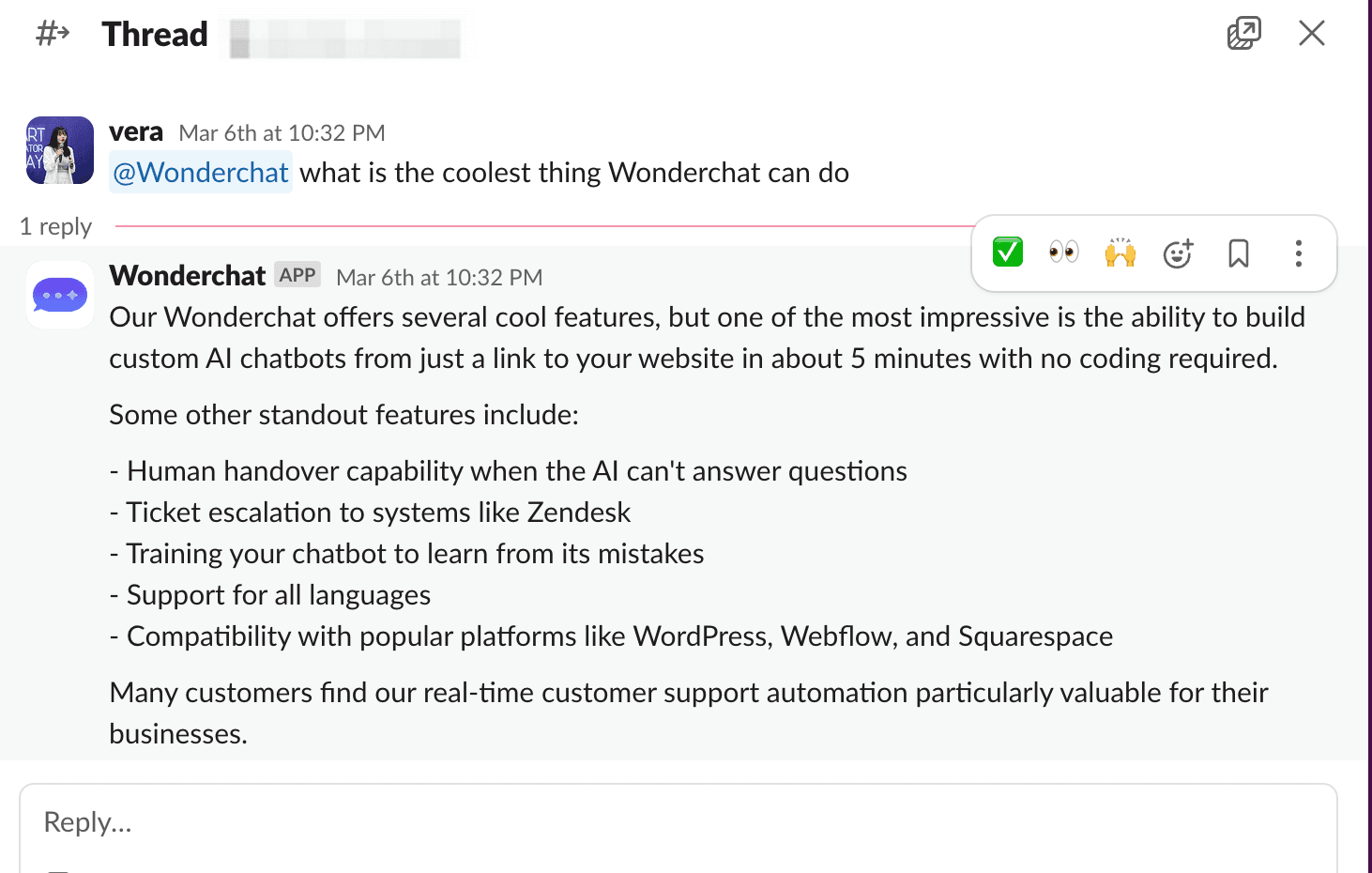
Upgrade Your Slack Channels with Wonderchat
An AI chatbot earns its place in Slack when it answers the questions your team keeps asking, from docs you already wrote.
The verdict: for answers from your own documents inside Slack, on a flat monthly plan with no per-seat cost, pick Wonderchat. For thread summaries only, Slack AI is already there. For Salesforce teams, choose Agentforce; for Slack-native ticketing, ClearFeed.
Start for free: the free plan refills 50 AI replies every month, needs no credit card and includes Slack.

