Summary
For customer-data-driven escalation, choose Fin, formerly Intercom, which Salesforce acquired in September 2026. Its Escalation Rules, Guidance, and Workflows support that setup.
Zendesk AI Agents is the stronger choice when private help-center answers must follow authenticated article permissions on eligible plans.
If your small team wants to inspect sources and fix wrong answers without replacing its support stack, Wonderchat combines citations, knowledge-gap reporting, and corrections your team approves.
No public, shared benchmark proves which of these seven is the most accurate.
A fluent answer can still be wrong. The agent may retrieve an old policy, miss a product version, or cite a real page that no longer applies. A polished demo doesn’t show whether your team can inspect the source, fix the problem, and hand off to a person when the evidence runs out.
The checks below focus on those controls. For a wider view of the market, start with the AI customer service chatbot comparison.
If you need an AI customer service agent that answers from your help-center content, use the same checks to compare Wonderchat with any other vendor.
What This Comparison Measures
The seven products aren't ranked by a made-up accuracy score. They are compared through four questions:
What content the agent may use.
How someone can inspect the supporting evidence.
What happens when the content can't support an answer.
Where the conversation goes next.
The original documentation review was completed on 6 October 2026. Sources supporting the revised access and handoff explanations were rechecked on 8 October 2026.
Wonderchat publishes this comparison and appears in it. The evidence comes from current vendor documentation, not shared account testing. A feature page can show that a control exists. It cannot show how well seven products would answer the same questions from the same document set.
Wonderchat's review analysis coded 1,309 complaints across 18 vendors, based on 837 reviews. Pricing was the largest theme, followed by setup, trust, and freshness. The sample doesn't establish market-wide rates or identify an accuracy winner, but it does show why setup and current content belong in the buying decision.
Which AI Support Agent Can Answer From Internal Docs?
Several AI support agents can answer from internal documents, including Wonderchat, Fin, Zendesk AI Agents, Freshdesk Omni, Gorgias, Yellow.ai, and Chatling.
File support alone is not enough. Check whether the source is approved for that audience, how access is enforced, and how quickly a changed document reaches the agent.
Check Who Can Receive the Answer
“Internal docs” can describe two different jobs.
A support team may keep troubleshooting steps or internal articles private while letting the agent use them in customer answers.
An employee agent has a harder job because it may need to respect different permissions for HR, finance, legal, and IT content.
Check three controls before connecting private material:
Source scope: Which pages, files, or systems can the agent search?
Audience access: Which users may receive an answer based on each source?
Update path: How quickly does a changed or revoked document stop shaping answers?
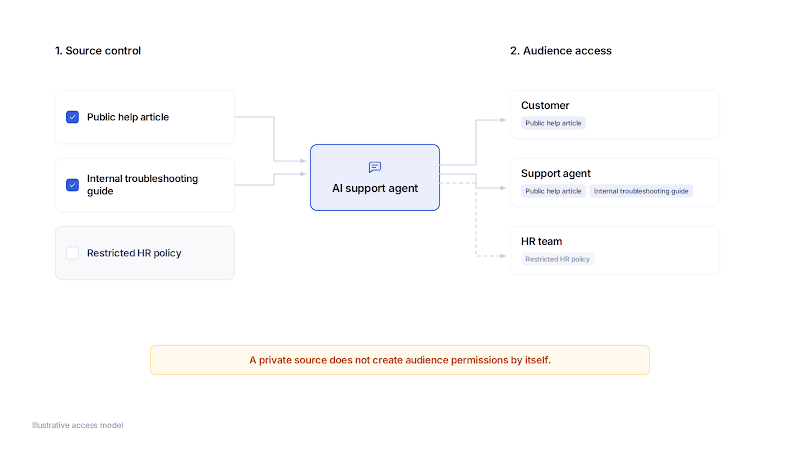
Source selection controls what the agent can search. Audience access controls who may receive an answer based on each source.
How the Access Controls Differ
You choose which internal articles Fin can use by enabling them in the article settings. Once enabled, Fin can draw on them when answering customers, but it does not link to those internal articles in its responses.
A private article can still shape a public answer.
Zendesk documents a more specific route for restricted help-center content. On eligible plans, a signed-in user's identity can be mapped to article permissions before the AI agent answers. The documented mapping applies to that help-center setup, not automatically to every external connector
Wonderchat can answer from selected web pages and supported files. A team controls which content enters the source set, but uploading a private file does not create employee-level permissions by itself. Teams building an internal agent should confirm who can open the agent, which sources each group can use, and what happens when access is revoked.
Consider a hypothetical salary policy.
Keeping the document out of a public help center doesn't make every answer drawn from it safe for every user. The buying question isn’t “Can it read this file?” It is “Who can receive an answer based on this file, and how is that rule enforced?”
Which AI Support Agents Have the Most Accurate Responses?
No public evidence supports one universal accuracy winner across these seven tools.
Compare every tool against the same current documents, expected answers, and questions. Score wrong answers, safe refusals, and successful handoffs separately instead of treating every closed conversation as correct.
Accuracy begins before the model writes. The retrieval step must find the right policy, product version, and exception. If retrieval supplies the wrong passage, a capable model can write a clear answer that is wrong for the customer's case. The confidence threshold is a decision signal, not a truth score.
Freshdesk Omni documents a Test area for evaluating its AI Agent. It can run a set of questions and show whether each was answered, the response, and the source used. A reviewer can accept or reject the result, but a thumbs-up inside a test doesn't become an independent production accuracy rate.
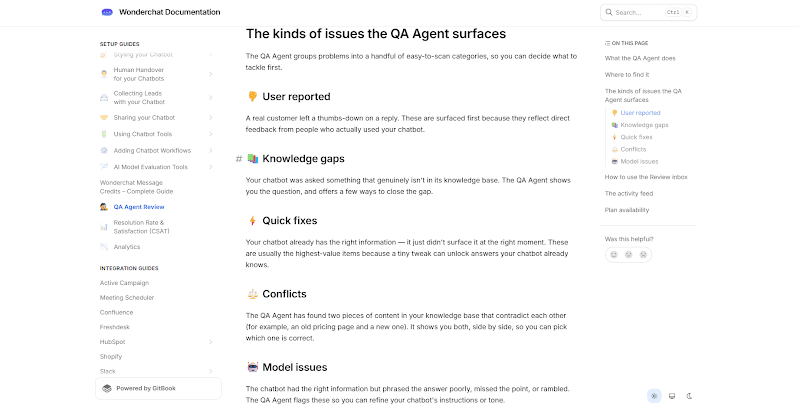
Wonderchat takes a review-loop approach. Its QA Agent groups conversation problems such as reported issues, knowledge gaps, quick fixes, content conflicts, and model-quality problems. It can draft a correction, but a person approves the change before it’s applied.
The control helps a team inspect and repair a problem. It does not guarantee that every future answer will be correct.
Use at least four labels in your own evaluation:
Correct answer: The response matches the expected answer and current source.
Wrong answer: The response conflicts with the expected answer or applies the wrong version.
Safe non-answer: The agent says the evidence is missing or asks for needed context.
Correct route: The request reaches the intended person or queue with the required information.
Keep these four results separate. One blended “accuracy” figure can hide a wrong answer or failed handoff.
Which Conversational AI Tools Offer Live Agent Escalation?
All seven tools document a route to human support, but that route isn't always live.
Some require a configured workflow, destination, and staffed queue. Others can collect an email when nobody is available. Check the trigger, the receiving team, the context transferred, and the fallback before calling any handoff complete.
A Complete Handoff Has Four Parts
A customer asking for a person is one trigger. Frustration, repeated failed answers, account type, a sensitive topic, or business hours can also affect the route. These conditions work differently, so a vendor's “human handoff” label isn't enough.
Trigger: What starts the handoff?
Context: Which transcript, customer details, and collected fields move with it?
Route: Which person, team, inbox, or ticket receives the request?
Fallback: What does the customer see when nobody is available?
How Fin, Zendesk, and Wonderchat Route the Request
For escalation driven by customer or conversation data, Fin offers Escalation Rules alongside natural-language Guidance and post-escalation Workflows.
Its escalation documentation covers direct requests for a person, strong frustration, and repeated loops. Teams can also add data-based Escalation Rules or natural-language Escalation Guidance. Intercom Workflows then decide what happens after escalation, such as collecting information, creating a ticket, or routing to a team. Fin Voice does not support the same data-based Rules, so the channel still matters.
Zendesk requires teams to design escalation paths in its dialogue builder. The flow can check availability, gather fields, choose a destination, and define a fallback if escalation fails. An established Zendesk operation can keep the route inside its current system, but it still has to build that route before launch.
Wonderchat documents built-in live chat and a separate email handover. A visitor can request live chat through a button that appears after the message count your team sets, during its configured opening hours. Separately, email handover can offer a contact form after a set message count or repeated failed answers.
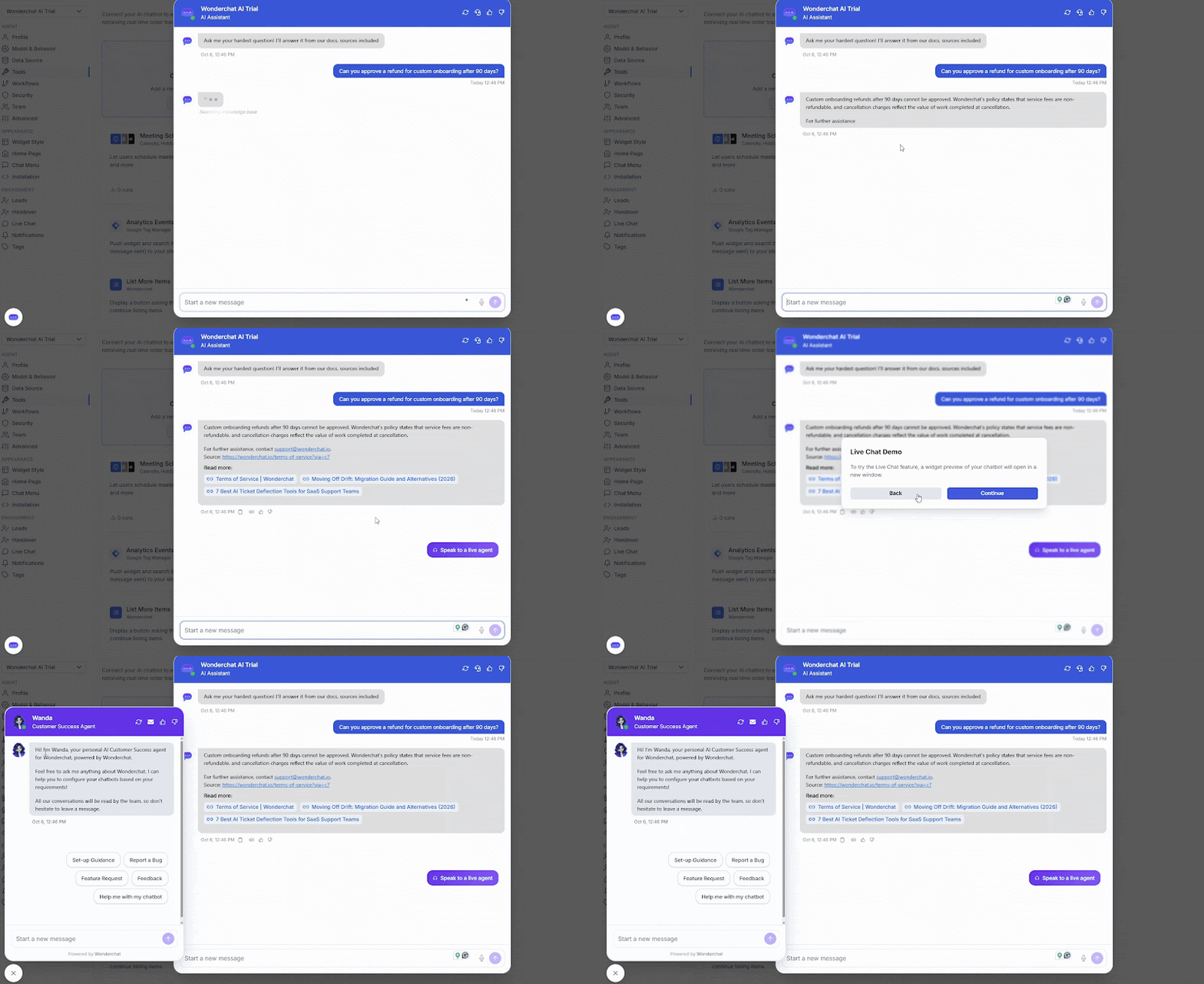
An email notification is not the same as a person receiving a live thread. The escalation and handoff guide explains the four parts worth checking: trigger, context, route, and fallback.
Run the full path before launch. Ask one question the agent cannot answer, request a person, and watch what reaches the receiving side. “Ticket created” and “human replied” are different results.
Which Chatbots Handle Complex Queries Without Human Help?
An AI support agent can handle a complex question only when it has the required facts, enough context, and permission to complete the task. Explaining three policy steps is different from changing an account or approving an exception. No tool in this comparison is supported as a safe answer to every complex request without human help.
Start by identifying the source of complexity:
Missing context: The customer didn't provide the product, account, order, or region.
Missing knowledge: The approved documents don't cover the question.
Conflicting knowledge: Two policies give different rules.
Action authority: The answer requires a refund, account change, approval, or another controlled action.
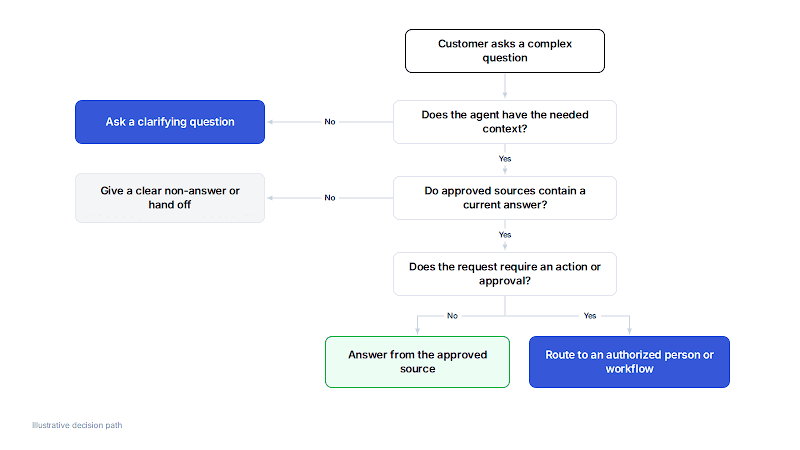
A complex question can need clarification, better documentation, or human authority. The correct path depends on what is missing.
Gorgias is designed around ecommerce support and connected store data, which gives it a practical fit for order and product questions. Freshdesk Omni can combine knowledge answers with configured workflows. Yellow.ai supports detailed knowledge and transfer flows for teams able to set them up.
Those mechanisms can reduce unnecessary handoffs for defined tasks, but they don't remove the need to set boundaries.
Imagine a customer asks where an order is, whether it qualifies for a return, and whether a manager can approve an exception. The first two parts may be answerable from order data and a current policy. The exception is a separate decision. A useful agent should not turn a clear explanation into authority it was never given.
Which AI Customer Service Agent Minimizes Hallucinations?
No shared benchmark proves that one of these seven agents hallucinates least.
Reduce the risk by limiting answers to approved sources, keeping those sources current, checking the evidence behind a reply, and stopping when the evidence is missing. A citation helps inspection, but it does not prove the cited source is current or correctly applied.
Across 1,679 AI answers in the helpdesk category, the word “citations” appeared zero times and “ticket” appeared 671 times.
Wonderchat’s AI visibility analysis describes the language appearing in those answers, not a hallucination rate. For your evaluation, inspect whether the cited passage is current and applies to the customer’s question.

A real citation can point to an archived policy. Source selection still needs review.
A costly failure happens before the answer is written. Retrieval selects an archived policy, and the agent answers from it correctly. The citation is real, but the customer receives a rule that no longer applies.
That is a retrieval failure before it is a writing problem. Grounding an answer in approved content limits the evidence the model can use, but the source set still needs ownership. Teams should remove retired pages, resolve conflicts, check sync schedules, and test questions that separate the old rule from the current one.
Gorgias documents that conflicting Guidance can produce inconsistent answers. Fin and Chatling document different schedules for connected sources. Wonderchat's review workflow can surface content conflicts and proposed corrections. Each control helps, but none turns source maintenance into a one-time task.
7 AI Support Agents Compared on Sources and Handoff
The profiles below use the same four fields: source scope, evidence inspection, human route, and operational boundary. They are not a measured ranking. Product order is for navigation.
1. Wonderchat: Selected Sources and Review
For small support teams, Wonderchat provides an AI customer service agent over selected web pages and supported files without replacing the full support stack. Teams can enable URL citations so a visitor can inspect the web sources behind an answer.
The QA Agent adds an operating loop after launch. It groups conversation problems, shows source conversations, and drafts changes for review. A person decides whether to apply the correction.
Configured live chat can move a visitor into Wonderchat's Live Chats area, while email handover covers a different, slower path.
Fin is the better choice if you already use Intercom and need escalation driven by customer or conversation data. Its Escalation Rules, Guidance, and Workflows provide more control over when to escalate and where the request goes than Wonderchat’s documented live chat and email handover. Wonderchat is not a full ticketing, voice, or workforce suite.
2. Fin: Escalation Rules and Workflows
Fin offers detailed escalation control for teams already operating in Intercom. It can use native public and internal articles, websites, PDFs, and supported connected sources. Source eligibility differs across Fin, Copilot, and the Help Center.
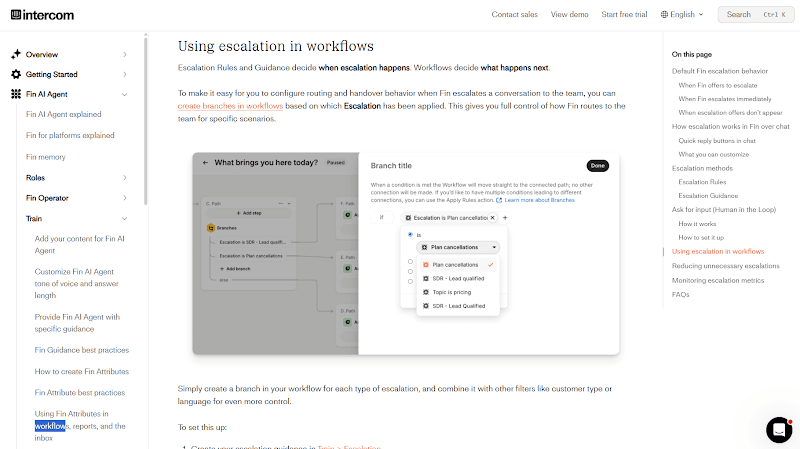
Escalation Rules can use customer or conversation data, while Escalation Guidance handles intent or behavior in natural language. Workflows control routing and post-escalation actions. Fin also has default behavior for direct human requests, frustration, and repeated loops.
The flexibility adds setup responsibility. A chat deployment without a human routing target will not offer normal escalation. Internal articles also need to be enabled for Fin before they can inform customer-facing answers.
3. Zendesk AI Agents: Restricted Help-Center Answers
Teams already running support in Zendesk can keep restricted help-center access and escalation close to their existing operation. Eligible setups can answer authenticated customers from private articles. Zendesk can also import or sync external knowledge sources, so the product is no longer limited to Zendesk Guide content.
For restricted help-center answers, eligible setups map the signed-in user to article permissions. Escalation flows can check availability, gather fields, choose a team, and define a fallback. That keeps knowledge access and ticket routing close to the existing support operation.

The setup is specific. Restricted article behavior depends on the documented plan and identity configuration, and the preview widget does not test restricted content.
Do not assume every external connector receives the same access controls.
4. Freshdesk Omni: Answer Evaluation and Routing
Freshdesk Omni's Test area lets teams review customer-facing Freddy AI Agent answers inside the same suite as their help desk.
The Test area can run up to 100 supplied questions. For each one, it can show:
whether the question was answered;
the response and source used;
an accept or reject control;
a preview retry or a new Q&A for an unanswered question.
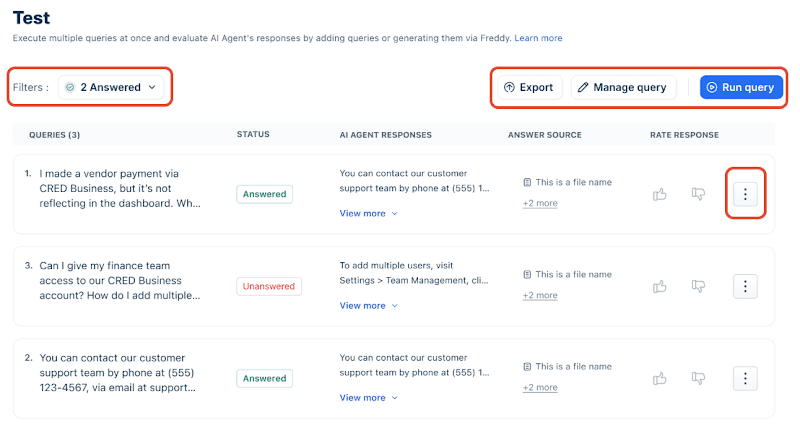
Current documentation lists the evaluator for Freshdesk Omni Growth, Pro, and Enterprise. The view is a useful admin control, not proof that customers see the same source detail or that accepted answers stay correct in production.
Knowledge must be fully learned, workflows configured, and handover settings defined before the test covers the full path.
5. Gorgias AI Agent: Storefront Support and Handover
Gorgias AI Agent connects answers to store knowledge and Shopify product information. Its knowledge sources can also include Guidance, help center or website content, and files.
Team members can inspect source information while coaching answers. Handover settings can respond to direct human requests, sensitive situations, or configured topics. Chat, email, and SMS don't use the same customer notices, and after-hours email collection isn't live support.
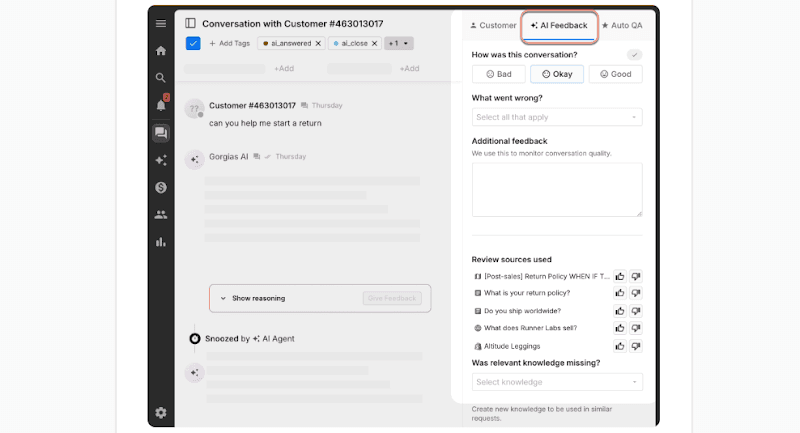
Order and product context make the retail focus valuable. For broad company policies, check whether the source, access, and workflow model works just as well outside the storefront.
6. Yellow.ai: Configured Knowledge and Transfer Flows
Yellow.ai gives implementation teams detailed control over knowledge and conversation flows. Its knowledge setup supports URLs, sitemaps, files, and ServiceNow knowledge, with scheduled checks for changed web content. Metadata can help narrow which documents a flow uses.
Live-agent transfer is connected through the Superagent profile and a transfer action in the flow. The implementation team chooses where the handoff appears in the conversation.
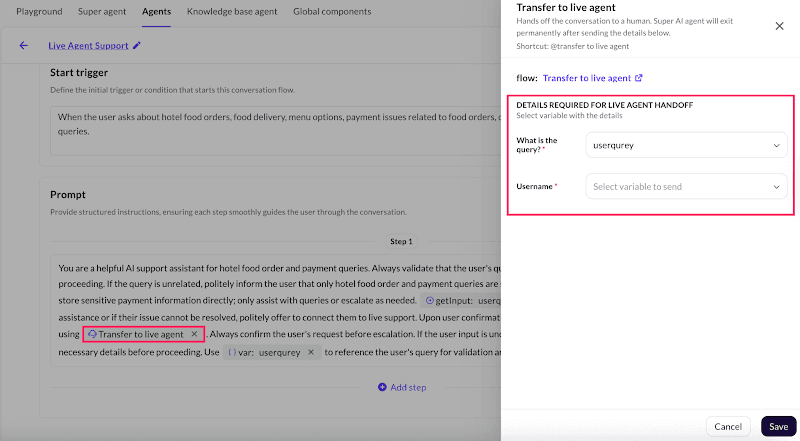
The detailed flow requires configuration work. Metadata filtering does not automatically prove per-user access control. The public transfer guide also doesn't show whether every transcript field or attachment reaches the human workspace, so those details need a deployment-specific check.
7. Chatling: Configurable Sources and Live Handoff
Chatling targets teams that want a no-code website agent. Its knowledge base supports several source types, including websites, sitemaps, files, text, FAQs, and documented knowledge integrations. Auto-sync can be set to daily, weekly, or monthly depending on the source.
The widget has a Show Sources for AI Response option that controls how many sources are displayed and which types are included. Human Handoff for an AI Agent can collect information and use ordered routing rules. The live-chat workspace displays conversations that need agent intervention.
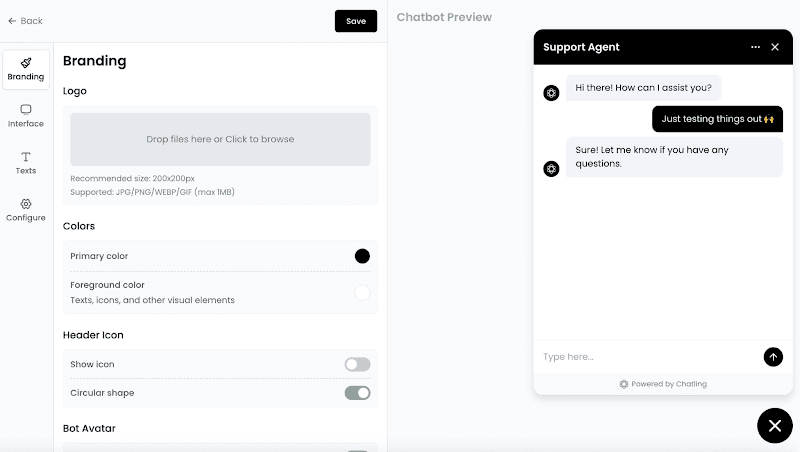
Handoff is disabled by default, and scheduled sync means a changed page may not appear immediately. Choose the refresh schedule and offline behavior instead of assuming both are automatic.
Compare Source Controls and Human Handoff
Product | Source and Access Scope | Evidence Inspection | Human Route | When the Docs Can't Answer | Main Boundary |
Selected websites and supported files | Configured URL citations and QA review | Enabled live chat or email handover | Configured failed-answer conditions to offer email handover. Knowledge gaps surface questions the agent could not answer | Not a full help desk; confirm account access | |
Enabled public, internal, web, PDF, and connected sources | Source controls vary by content type | Rules or Guidance, then Workflows | Can ask for more information and offer human support if the issue remains unresolved. Escalation depends on its settings and routing target. | Private content can inform a public answer | |
External knowledge and authenticated restricted articles | Confirm visitor-facing source behavior in the intended setup | Configured destination, availability, and fallback | Uses configured escalation paths with a destination and fallback. The team must build the appropriate path before launch. | Restricted article controls don't prove every connector's permissions | |
Learned knowledge sources | Evaluator shows response and source | Configured handover and workflows | Its Email AI Agent can escalate when unsure or outside its scope. Handover and after-hours behavior require configuration. | Evaluator view is not a visitor citation | |
Storefront knowledge, Guidance, web content, and files | Team source inspection and feedback | Configured chat, email, or SMS handover | Hands over when it lacks enough knowledge or its draft is not reliable enough. Offline chat collects an email for follow-up. | Customer notice and after-hours paths differ | |
URLs, sitemaps, files, ServiceNow, and metadata | Confirm source display in the intended setup | Linked transfer flow | A configured Transfer to Live Agent action passes the query into the linked live-agent flow and receiving inbox. | Verify the fields that reach the receiving agent | |
Websites, files, FAQs, integrations, and scheduled sync | Configured widget source display | Enabled Human Handoff action | An enabled Human Handoff action can transfer an unsuccessful conversation. The receiving view flags agent intervention and includes an AI summary. | Handoff is disabled by default |
Documented controls differ by setup. This table is not an accuracy benchmark.
Check the Failure Path Before Launch
Start with a ten-minute check on an agent that is already configured. Ask one question your current docs answer, one relevant question they do not cover, and one direct request for a person.
Inspect the answer and its source, the response to missing information, and the conversation arriving on the receiving side. This is an initial check, not a full accuracy evaluation.
Watch Wanda answer a support question, then decline a refund decision that needs a person.
Wanda directs the refund question to support. The recording shows email handover settings, not confirmation that a person received the request.
Then use the six checks below for a fuller pre-launch review:
Ask a current-policy question. Record the expected answer and approved source before running the check.
Change the wording and add context. Include the product version, region, or account type that changes the answer.
Ask a real unanswered question. A safe result may be a clarification, a clear non-answer, or a human route.
Check an outdated-source case. Use an existing archived document only in a safe test environment. Do not hide a correct source to force failure.
Check access. Ask the same restricted question as an authorized and unauthorized user where the product documents that control.
Request a person. Run the path once during staffed hours and once when nobody is available.
For each question, record the expected source, expected answer, actual response, cited source, and route. Count correct answers only against questions with an expected answer. Track safe non-answers separately. A request that correctly stops but fails to reach the intended person is not a successful handoff.
The same check should be repeated after a policy change, connector change, or routing update. A launch test describes one setup at a time. It is not a permanent accuracy certificate.
See What Your Help Center Can't Answer With Wonderchat
Your easiest FAQ is only the starting point. Include a question your docs do not cover, then check whether the agent gives a clear non-answer and offers the human route you configured.
Wonderchat’s gap report surfaces unanswered questions. Its QA Agent groups conversation problems and drafts corrections, but your team approves a change before it is applied. You can inspect the source behind a reply rather than treating a confident answer as proof.
Check the current plans and pricing for your setup.
Paste your help center. It reads the pages and shows you the questions they don’t cover.
See what your help center can't answer
Frequently Asked Questions
What are the top 3 AI agents for support?
Fin, Zendesk AI Agents, and Wonderchat serve different needs. Choose Fin for customer-data-driven escalation, Zendesk for authenticated help-center permissions, and Wonderchat for source inspection and approved corrections without replacing your support stack. These are situational choices, not an accuracy ranking.
Can you get an AI support agent for free?
Yes. Wonderchat offers a Free plan. Check its current allowance, supported sources, and handover options before relying on it for customer support. A free plan gives you a starting point, not proof that the agent can handle your workload.
What are the 7 types of AI agents?
There is no universal seven-type classification. IBM describes five main types: simple reflex, model-based reflex, goal-based, utility-based, and learning agents. For support, check the product’s source access, permitted actions, and human handoff rather than choosing by a taxonomy label.
What happens when an AI support agent can't answer?
Depending on its configuration, it can ask for more context, state that it lacks enough information, or offer human support. Check what happens after that offer. A successful handoff reaches a staffed inbox or a clear follow-up route, rather than stopping at a button.
Can an AI support agent read your internal documentation?
Yes, if the product supports those sources and you enable them. Some tools can use a private article without showing the article itself. That does not make every generated answer safe for every customer. Confirm who can receive answers based on each source.