
Summary
Clari and Salesloft named 1mind as Drift’s exclusive AI successor on March 6, 2026, and Drift retires on 31 January 2027, with data deleted on 1 May 2027.
Export conversation history and contact data early because Drift does not provide a bulk export for every conversation.
Playbooks, qualification branches, routing rules, calendar logic, and CRM field mappings must usually be documented and rebuilt.
Choose a replacement based on the job Drift performs today, whether that is pipeline conversion, Salesforce routing, meeting booking, or a mix of sales and support.
Moving off Drift means exporting conversation history, contacts, playbooks, routing rules, and integration maps before access changes, then rebuilding qualification logic in the new platform.
The export is the part with a deadline because Drift has no single bulk export for every conversation, while playbooks and routing rules are configurations rather than portable workflows. Most migration risk sits in data and logic that may be difficult to recover later, not in installing the next chat widget.
On March 6, 2026, Clari and Salesloft named 1mind the exclusive AI successor to Drift. Based on the current Salesloft Chat Agents page, the company now says it has transitioned from Drift to 1mind, and Drift retires on 31 January 2027, with data deleted on 1 May 2027.
Use the renewal date, the account notice, and the written answer from the Salesloft account team as the actual deadline. Drift customers chose the platform because its playbooks, qualification flows, sales routing, and meeting booking worked together, and those are the parts that require careful rebuilding.
This guide is for the marketing, sales, and RevOps teams responsible for that work, regardless of which replacement they choose.
What Drift Customers Lose During Migration
Drift was not just a website chat box. A mature account may contain years of decisions about who sees each message, which questions qualify a buyer, which sales representative receives the lead, and what data enters the CRM.
Five parts of that setup need special care.
Playbooks and qualification logic. Questions, branches, fallback messages, meeting steps, and goals do not become portable workflows merely because the next platform also has a flow builder.
Routing and ownership rules. Territory, company size, account ownership, working hours, representative availability, and fallback queues may be spread across playbooks, teams, inboxes, calendars, and CRM rules.
Conversation history. A new tool rarely displays old Drift conversations in its working inbox. The history may need to remain in a separate archive even when contacts are imported.
Integration behavior. A Salesforce or HubSpot connection is more than an app name. Field mappings, deduplication rules, lifecycle updates, Slack alerts, campaign enrollment, and meeting ownership all need to be traced.
Reporting continuity. Conversion rates can appear to rise or fall when the new platform counts conversations, qualified leads, meetings, or influenced pipeline differently.
The first move should be an inventory, not a product demo. Each active Drift flow should have an owner, trigger, audience, qualification goal, route, CRM action, meeting path, and performance baseline before anyone tries to rebuild it.
What to Export From Drift Before Access Changes
Drift’s official conversation export guide says there is no single bulk export for all conversation data. The documented method lists conversation IDs in pages, then retrieves each conversation, transcript or message set, attachment, contact, and related user information through the API.
The Playbooks API creates another limit that is easy to miss. It returns enabled and active playbooks, while disabled, inactive, and archived playbooks are excluded. Those older flows need a manual record if they contain logic the team may want later.
The table below is the checklist to send to RevOps before any account setting changes.
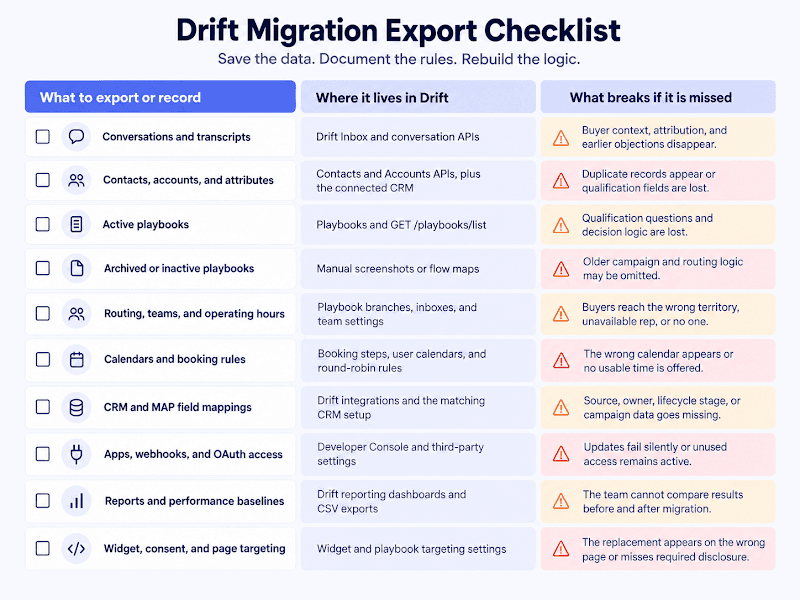
What to export or record | Where it lives in Drift | What breaks if it is skipped |
Conversation IDs, status, timestamps, tags, inbox, contact ID, and related playbook ID | Drift Inbox and the Conversation List and Conversation endpoints | Historical analysis loses the link between a buyer, conversation, playbook, and receiving team. |
Full transcripts, individual messages, and attachments | Transcript, Messages, and Attachments endpoints for each conversation ID | Sales representatives lose earlier questions, objections, promises, and shared files when a buyer returns. |
Contacts, accounts, custom attributes, and external IDs | Contacts and Accounts areas, the Drift APIs, and the connected CRM | Imported contacts may duplicate existing CRM records or lose the fields used for qualification and routing. |
Active playbooks, goals, questions, branches, and page targeting | Playbooks in Drift and GET /playbooks/list for enabled playbooks | The new system receives the wording but not the decision logic that turned a visitor into a routed lead. |
Disabled, inactive, and archived playbooks | The Playbooks area, recorded manually with screenshots or a flow map | The API may omit an older flow that still explains a campaign, report, or routing decision. |
Routing rules, teams, inboxes, operating hours, and fallback owners | Playbook branches, team and inbox settings, and calendar assignment rules | Qualified buyers may reach the wrong territory, an unavailable representative, or no one at all. |
Meeting-booking steps and calendar ownership | Booking steps, user calendar connections, round-robin logic, and representative availability | A working qualification flow can still send the buyer to the wrong calendar or offer no usable time. |
CRM and marketing automation field mappings | Drift integration settings and the matching Salesforce, HubSpot, or marketing automation setup | Contacts may sync without source, lifecycle stage, owner, campaign, or qualification details. |
Custom apps, webhooks, OAuth scopes, and endpoint owners | Drift Developer Console and third-party integration settings | Downstream alerts and updates can stop silently, while unused tokens may remain active after cutover. |
Reports and current performance baselines | Drift reporting dashboards and any available CSV export | The team cannot compare engagement, qualified leads, bookings, held meetings, or pipeline before and after migration. |
Widget copy, consent text, audience rules, and page placement | Widget and playbook targeting settings | The replacement may appear on the wrong pages, greet the wrong visitors, or miss required disclosure and consent text. |
Export the data that cannot be recreated, then document the rules that cannot be imported. A migration is incomplete if the new widget works but the old routing, attribution, or calendar path does not.
Keep the raw API response as well as a reviewable copy. JSON preserves IDs and attributes, while CSV files or readable transcripts make validation easier for marketing and sales teams.
Before accepting the export, compare the number of conversation IDs requested with the number of files received. Also open at least ten random conversations, plus several with attachments, handoffs, meeting bookings, and multiple participants. A successful download is not proof that every record is usable.
How the 2025 Drift Security Incident Changes Offboarding
Keep the August 2025 security incident separate from Drift’s 2026 product transition because the public evidence does not establish that one caused the other. However, the incident does change what a complete migration checklist should include.
The incident involved compromised credentials connected to Drift’s Salesforce integration. Salesforce invalidated active tokens, disabled the Drift connection on August 28, 2025, and said in its May 2026 security notice that Drift would remain disabled until further notice.
Cloudflare reported that the threat actor accessed text from its Salesforce case records and found 104 Cloudflare API tokens in the exposed material, although it found no suspicious activity tied to those tokens. Cloudflare rotated all 104 and advised companies to review third-party access and rotate credentials.
That history does not mean every current Drift connection is unsafe. It does mean that removing the widget is not the final security step. At cutover, an administrator should revoke Drift OAuth access, rotate custom API keys, remove unused webhooks, check connected-app logs, and confirm that former integration users no longer have access.
A Realistic Drift Migration Timeline
Budget about eight weeks for one website with established CRM and calendar rules. Several regions, brands, CRMs, or security reviews can extend the project to 10 or 12 weeks.
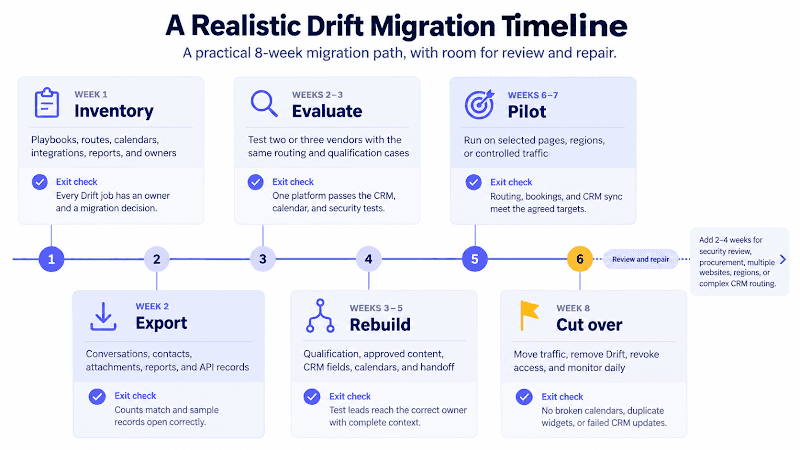
Timing | Work | Exit check |
Week 1 | Inventory every active and inactive playbook, route, calendar, CRM field, integration, report, and owner. Freeze non-essential Drift changes. | Every current Drift job has an owner and a decision to migrate, replace, archive, or retire. |
Week 2 | Export conversations, contacts, accounts, attachments, reports, and API records. Record playbooks and routing manually. | Record counts reconcile, sample files open, and backups exist in an approved location. |
Weeks 2-3 | Test two or three replacement platforms using the same real qualification and routing cases. | One vendor passes the required questions, CRM updates, meeting path, and security review. |
Weeks 3-5 | Rebuild the highest-value flows, connect approved content, map CRM fields, and configure calendars and human handoff. | Test leads reach the correct owner with the correct context and no duplicate CRM record. |
Weeks 6-7 | Run a limited parallel pilot on selected pages, regions, or traffic segments while keeping a rollback path. | The replacement meets agreed targets for routing, qualified leads, bookings, and sync success. |
Week 8 | Move production traffic, remove the Drift script, revoke access, rotate credentials, and monitor daily. | No duplicate widget loads, broken calendars, lost form submissions, or failed CRM updates appear. |
Weeks 9-10 | Review the first full production sample and fix missed questions, routing errors, content gaps, and report definitions. | Marketing and sales accept the results, and the Drift account can move into final retention or deletion steps. |
A high-traffic site may need a longer parallel period. Instead of placing two widgets in front of the same visitor, split the test by page, region, or controlled traffic segment so attribution remains clear and the experience does not conflict.
Best Drift Alternatives by Migration Goal
There is no single Drift alternative because Drift performed several jobs. The right shortlist depends on whether the team values deep Salesforce routing, AI-led product demonstrations, CRM consolidation, mixed sales and support, or a lighter conversion agent.
Product details below were checked on September 1, 2026. The table describes documented fit rather than independently tested performance.
Platform | Best fit after Drift | What to test before choosing it |
Teams that want the official successor and an AI-led sales experience spanning website conversations, qualification, demos, live calls, and customer growth. | Confirm which Drift data, flows, and integrations are migrated for the customer and which must be rebuilt. | |
Enterprise revenue teams that rely on Salesforce, account signals, advanced conversation routing, live sales handoff, and meeting booking. | Recreate the hardest territory, account-owner, availability, and CRM-routing case from the Drift setup. | |
Teams that want product questions answered from approved content, followed by lead capture, qualification, routing, and a shared Calendly booking link. | Check whether the team needs deeper account identification or Salesforce-native ABM logic than Wonderchat currently documents. | |
Teams already using HubSpot that want website conversations, lead qualification, meeting booking, and CRM context in the same platform. | Confirm the HubSpot edition, credit use, channel support, and whether every Drift route can be rebuilt with HubSpot data. | |
Teams whose Drift traffic mixes product questions, inbound sales, and customer support within one messenger and inbox. | Test sales qualification separately from service, including content access, rep takeover, booking, email follow-up, and reporting. |
Qualified deserves the first demo when complex Salesforce routing and enterprise ABM were the reason Drift was purchased. The current Qualified platform documents advanced conversation and meeting routing, Salesforce reporting, and integrations with more than 20 go-to-market systems.
1mind is the natural option to inspect when a team wants to follow the official transition path, but it should still be evaluated as a new platform. Its current product extends beyond website text chat into video, voice, product demonstrations, live sales calls, and post-sale work, so the change is not a direct playbook import.
Wonderchat fits a small B2B team with real product docs that values quick, source-based answers, structured qualification, CRM routing, and a shared Calendly booking link, without rebuilding its wider revenue stack.
It’s not the best answer when Drift’s deep Salesforce account routing or visitor-identification layer was the central requirement, and Wonderchat would not hide that difference.
At Wonderchat, a Drift migration is treated as a rebuild, not a widget swap. Even when the new agent is quick to set up, the team still has to preserve conversation history, recreate qualification rules, test CRM field mappings, and prove that human handoff and calendar booking work before Drift is removed.
What to Ask Any Drift Replacement
Use the exported Drift inventory as the vendor scorecard instead of asking which platform has the longest feature list.
What can you import, and what must be rebuilt? Ask separately about contacts, transcripts, attachments, playbooks, routing logic, knowledge, reports, and CRM field mappings.
Can you reproduce our hardest routing case live? Use a named account, an existing CRM owner, a territory rule, an unavailable representative, and an after-hours fallback.
What happens when the agent cannot answer or qualify the buyer? Check whether it asks for clarification, stops, routes to a person, or invents a plausible response.
Can the correct representative’s calendar appear inside the conversation? Test ownership, round-robin rules, time zones, working hours, and a calendar with no available times.
Which CRM fields does the platform read and write? Confirm the object, field, direction, update timing, match key, duplicate rule, and action taken when the CRM is unavailable.
Can results be reviewed by page, playbook, source, owner, and campaign? One blended conversion number can hide a broken pricing-page route or a low-quality campaign.
Which permissions and tokens does the integration require? Ask whether scopes can be narrowed, who can revoke access, how logs are retained, and how quickly credentials can be rotated.
How do we export our data if we leave you later? A migration is the best time to prevent the next migration from becoming another recovery project.
The uncomfortable questions are often the most useful. Wonderchat does not turn a Drift playbook into an identical imported workflow, and teams should ask Wonderchat the same questions about history, account routing, CRM behavior, and exportability that they ask every other vendor.
How to Cut Over Without Losing Pipeline
The final cutover should begin with one proven flow rather than the entire website. Choose the highest-value Drift playbook on the pricing page, demo page, or product page and test the complete path from the visitor’s first question to the CRM record and booked meeting.
Before removing Drift, confirm that the replacement can:
Answer the ten buying questions most often asked in that flow.
Collect every field required for qualification without turning the conversation into a long form.
Route a qualified buyer to the correct owner, team, and calendar.
Preserve the transcript, source page, campaign, and qualification details in the CRM.
Handle an unavailable representative and an after-hours request.
Stop or follow a defined escalation and handoff path when approved content does not support an answer.
Record the same business outcomes used in the pre-migration baseline.
Keep the Drift script ready for rollback until the replacement has passed the agreed production sample. After cutover, remove the old script from the tag manager and application, check every domain and language version, revoke integration access, and watch CRM failures and calendar errors daily.
The migration is complete when marketing can explain what changed, sales trusts the leads and context it receives, RevOps can reconcile the data, and security confirms that the old access paths are closed.
Move One Drift Flow Before Rebuilding Everything
A polished demo can hide the exact routing and integration problems that make a migration difficult. Start with one live Drift flow that qualifies a buyer, selects an owner, offers a meeting, and writes several fields to the CRM, then require every shortlisted platform to reproduce the same result.
With Wonderchat, your team can connect approved sales content, configure qualification questions, route qualified visitors, and share your Calendly booking link. The agent answers only from that approved content, and when no page covers a question it says so and passes the full chat to a person.
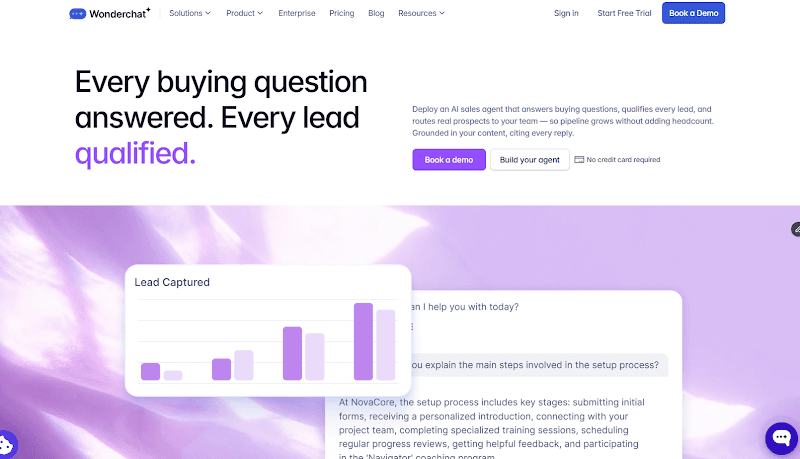
The Conversion Agent doesn’t import every Drift rule automatically, so the pilot should include the manual rebuild, the CRM field map, and the route to a person.
Review the current Wonderchat plans, build the highest-value flow, and compare it with 1mind, Qualified, HubSpot, or Intercom before committing to the rest of the migration.
Frequently Asked Questions
Is Drift shutting down?
Drift is being transitioned rather than switched off for every customer on one published date. Clari and Salesloft have said Drift retires on 31 January 2027, with data deleted on 1 May 2027. Existing customers should confirm their own access and renewal dates in writing.
What is replacing Drift?
1mind is the exclusive AI successor named by Clari and Salesloft. It is not the only migration option, and customers should also compare Qualified, Wonderchat, HubSpot, and Intercom according to the pipeline, routing, meeting, and CRM work Drift performs for them.
How do I export conversations from Drift?
Drift documents an API process rather than one bulk export. List conversation IDs, then retrieve each conversation, transcript or message set, attachment, contact, and related user information. Reconcile record counts and inspect sample conversations before accepting the archive.
Can Drift playbooks be migrated automatically?
Drift playbooks normally need to be documented and rebuilt in the replacement platform. The Playbooks API lists active and enabled playbooks, but it does not provide a portable workflow that another vendor can import, and disabled or archived playbooks may require manual screenshots or flow maps.
How long does a Drift migration take?
A focused migration for one website can take about eight weeks when inventory, export, vendor testing, rebuilding, integration work, a parallel pilot, and cutover are included. Security review, procurement, several websites, or complex CRM routing can extend the plan to ten or twelve weeks.
What are the best Drift alternatives?
Qualified is a close fit for Salesforce-centered enterprise conversational sales, while 1mind is the official AI successor. Wonderchat fits content-based qualification and Calendly booking, HubSpot suits CRM-centered teams, and Intercom fits businesses combining inbound sales with customer support.
Author: Vera Sun, Co-founder at Wonderchat
Updated: September 1, 2026

