HubSpot Integration for Your AI Agents

Connect Wonderchat to HubSpot in seconds to sync leads automatically. Retrieve contact data, update records, and log meetings directly from your AI agent.

Trusted by businesses worldwide

Easy 5 minute set-up

How Wonderchat Works
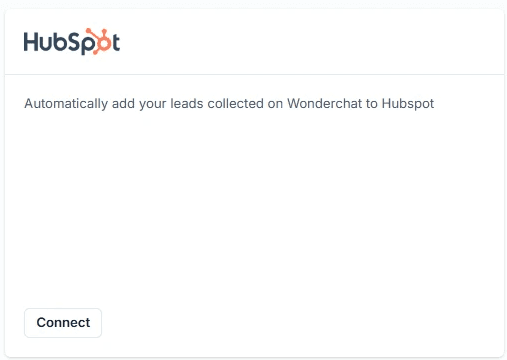
One-Click HubSpot Connection

Connect to HubSpot in a few clicks

From your Wonderchat admin dashboard, go to Settings then Integrations, locate HubSpot, and click Connect. A new tab opens for you to log in and authorize the sync. Refresh your dashboard and the integration shows as Connected — no developer required.

OAuth login flow

No coding required

Live connection status
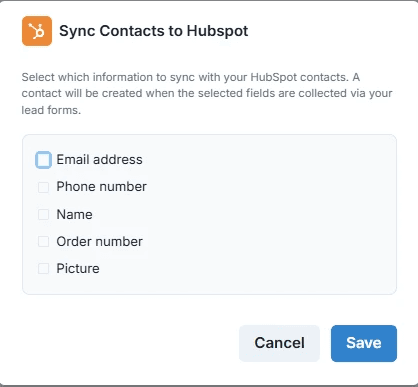
HubSpot Contact Sync

Automatically sync chatbot leads to HubSpot

Enable the Sync Contacts tool inside your agent's Tools settings to push visitor data captured during conversations directly into HubSpot. Choose exactly which fields to sync so your CRM receives clean, structured data without any manual entry from your team.

Selectable sync fields

Automatic lead capture

No duplicate data entry
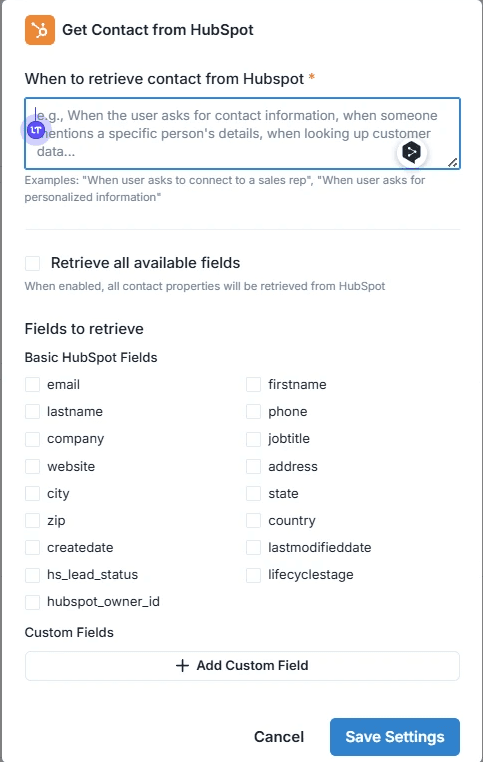
Retrieve HubSpot Contact Data

Pull live contact details into every conversation

The Retrieve Contact tool lets your AI agent look up a HubSpot contact by email address mid-conversation and surface their details in real time. Select which contact fields to retrieve so agents always have the right context before responding.

Email-based lookup

Real-time data retrieval

Configurable field selection

5-minute set up with our native integration

Set Up Your Live Chat Alternative in Minutes

1

Create your AI chatbot – Pick the perfect AI model fit for your support needs.

2

Train AI with Docs, FAQs & Policies – Upload knowledge base files and site links.

3

Customise Workflows & Escalation Rules – AI handles what it can, and escalates what it can’t.

4

Monitor & Optimise with Analytics – See where customers get stuck and fine-tune responses.
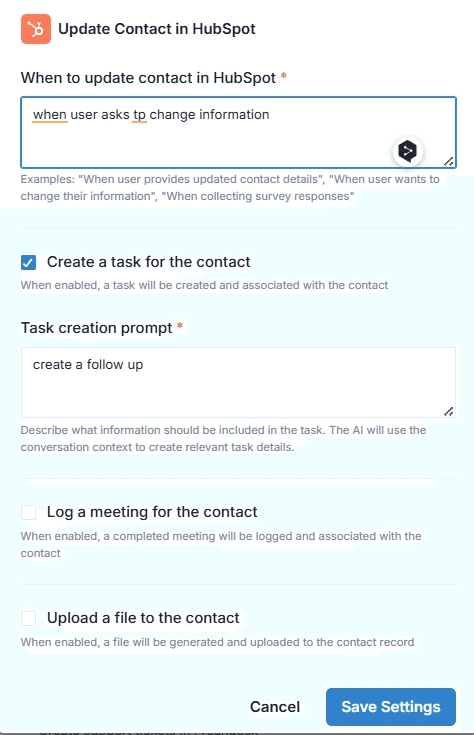
HubSpot Actions in Workflows

Use HubSpot data inside Wonderchat workflows

Inside Wonderchat's workflow builder, add a HubSpot action such as Get Contact to any workflow step. Define when the action fires and what data to retrieve, so complex multi-step automations can pull or push CRM data exactly when the conversation requires it.

Workflow-level HubSpot actions

Conditional trigger logic

Seamless CRM automation

Testimonials

Businesses with successful customer service start

with Wonderchat

Testimonials

Businesses with successful customer service start

with Wonderchat

Industry Grade Compliance

Wonderchat is GDPR compliant and AICPA SOC 2 Certified.

Industry Grade Compliance

Wonderchat is GDPR compliant and AICPA SOC 2 Certified.

FAQ

How do I connect Wonderchat to HubSpot?

Go to your Wonderchat admin dashboard, navigate to Settings then Integrations, find HubSpot, and click Connect. A new browser tab will open prompting you to log in to your HubSpot account and authorize the sync with Wonderchat. Once you click Allow, return to your Wonderchat dashboard, refresh the page, and the integration will show as Connected.

What HubSpot actions can my AI agent perform?

Your AI agent can perform three core HubSpot actions: sync new contact data captured in chat directly to HubSpot, retrieve detailed contact information from HubSpot by email address during a conversation, and update existing HubSpot contact records. The update action also supports task creation, meeting logging, and file uploads to a contact record — all triggered from within the chatbot interaction.

Can I choose which contact fields to sync with HubSpot?

Yes. For each of the three HubSpot tools — Sync Contacts, Retrieve Contact, and Update Contact — you can individually select which fields to include. This gives you precise control over what data flows between Wonderchat and HubSpot, so your CRM only receives the information your team actually needs.

Can I enable multiple HubSpot tools on the same chatbot?

Yes. Inside your agent's Tools settings, you can enable or disable any combination of the available HubSpot tools — Sync Contacts, Retrieve Contact, and Update Contact — independently. Each tool can be configured separately, allowing you to tailor exactly how each chatbot interacts with your HubSpot data.

How does the HubSpot integration work inside Wonderchat workflows?

When building a workflow in Wonderchat, you can add a HubSpot action — such as Get Contact — as a step within any workflow. You define the trigger condition and the action executes automatically when that condition is met during a conversation. This allows complex, multi-step automations to pull or push HubSpot data at precisely the right moment.

FAQ

How do I connect Wonderchat to HubSpot?

Go to your Wonderchat admin dashboard, navigate to Settings then Integrations, find HubSpot, and click Connect. A new browser tab will open prompting you to log in to your HubSpot account and authorize the sync with Wonderchat. Once you click Allow, return to your Wonderchat dashboard, refresh the page, and the integration will show as Connected.

What HubSpot actions can my AI agent perform?

Your AI agent can perform three core HubSpot actions: sync new contact data captured in chat directly to HubSpot, retrieve detailed contact information from HubSpot by email address during a conversation, and update existing HubSpot contact records. The update action also supports task creation, meeting logging, and file uploads to a contact record — all triggered from within the chatbot interaction.

Can I choose which contact fields to sync with HubSpot?

Yes. For each of the three HubSpot tools — Sync Contacts, Retrieve Contact, and Update Contact — you can individually select which fields to include. This gives you precise control over what data flows between Wonderchat and HubSpot, so your CRM only receives the information your team actually needs.

Can I enable multiple HubSpot tools on the same chatbot?

Yes. Inside your agent's Tools settings, you can enable or disable any combination of the available HubSpot tools — Sync Contacts, Retrieve Contact, and Update Contact — independently. Each tool can be configured separately, allowing you to tailor exactly how each chatbot interacts with your HubSpot data.

How does the HubSpot integration work inside Wonderchat workflows?

When building a workflow in Wonderchat, you can add a HubSpot action — such as Get Contact — as a step within any workflow. You define the trigger condition and the action executes automatically when that condition is met during a conversation. This allows complex, multi-step automations to pull or push HubSpot data at precisely the right moment.

40+ Languages

Starts at $0.02/message

Available 24/7

AI agents that service your customers end-to-end

14-day free trial. No credit card required

40+ Languages

Starts at $0.02/message

Available 24/7

Sync Wonderchat with HubSpot Today

14-day free trial. No credit card required