Sync Chatbot Leads to HubSpot Automatically

Go beyond a basic connection. Automatically sync contacts, retrieve records, and create AI-powered tasks for your sales team directly from chatbot conversations.

Trusted by businesses worldwide

Easy 5 minute set-up

How Wonderchat Works
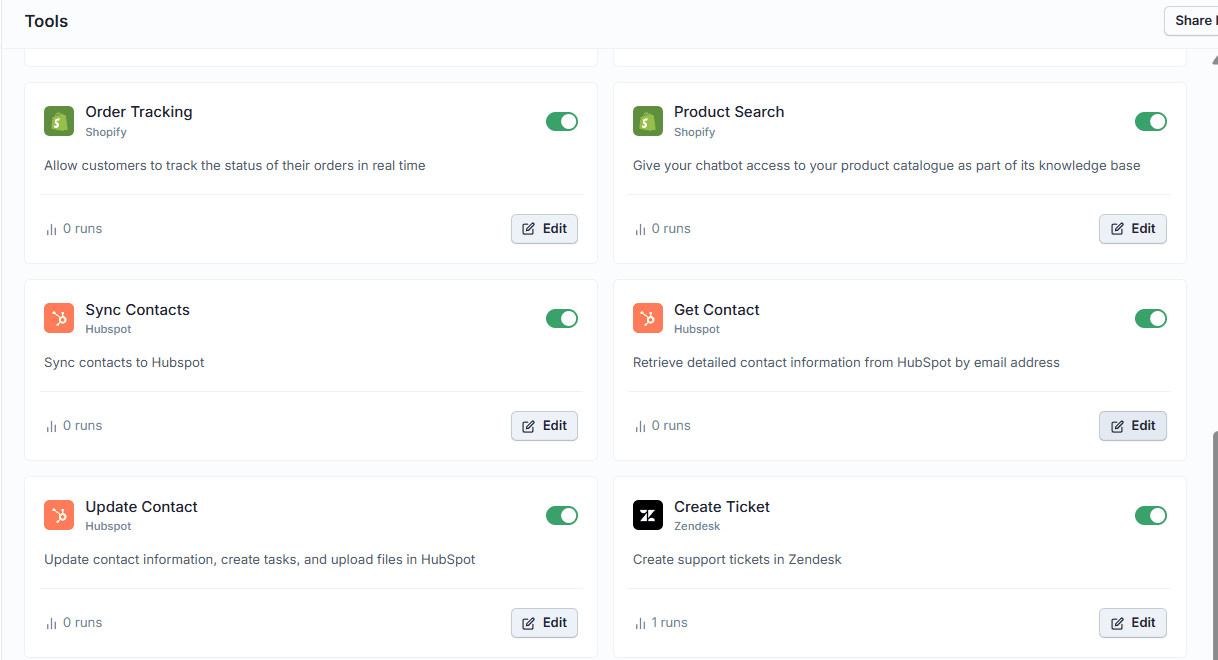
Sync Chatbot Contacts to HubSpot

Automatically sync contact data from every conversation

Inside your chatbot editor under Tools, the Sync Contacts tool lets you choose exactly which contact information to capture from chatbot conversations and push directly into HubSpot. Select the fields relevant to your workflow and contacts are created without any manual input.

Choose which fields to sync

No manual data entry

Contacts created automatically
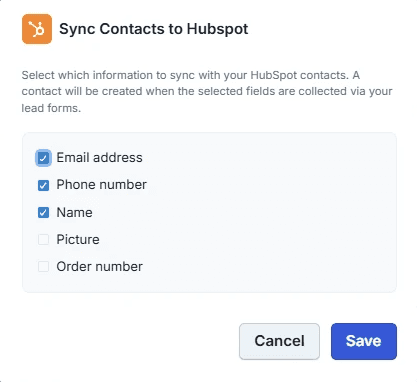
Retrieve HubSpot Contact Data

Pull live contact records into your chatbot

The Get Contact tool retrieves detailed contact information from HubSpot by email address during a conversation. Choose to retrieve all available fields or select only the ones you need. Custom fields are also supported for teams with non-standard CRM setups.

Lookup contacts by email

Select specific fields

Supports custom fields
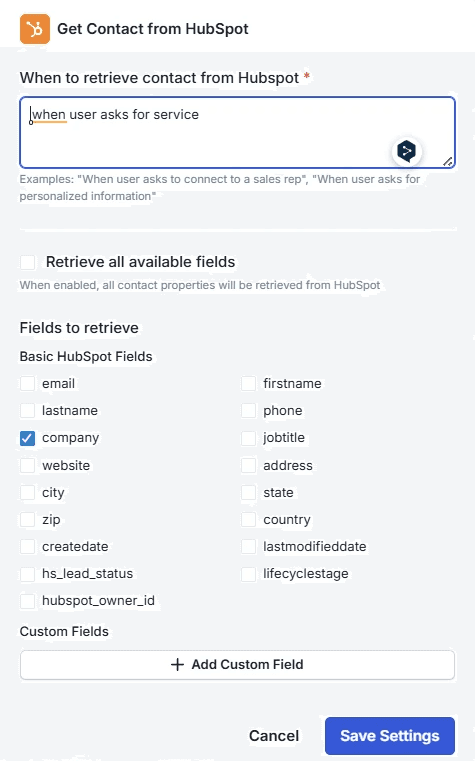
Update HubSpot Records from Chat

Update contact records without leaving the conversation

The Update Contact tool lets you configure when a contact record in HubSpot should be updated based on the chatbot conversation. Control exactly which fields get written back to HubSpot and keep your CRM records accurate and current without any manual effort.

Trigger updates from conversations

Control which fields update

Keep CRM records accurate

5-minute set up with our native integration

Set Up Your Live Chat Alternative in Minutes

1

Create your AI chatbot – Pick the perfect AI model fit for your support needs.

2

Train AI with Docs, FAQs & Policies – Upload knowledge base files and site links.

3

Customise Workflows & Escalation Rules – AI handles what it can, and escalates what it can’t.

4

Monitor & Optimise with Analytics – See where customers get stuck and fine-tune responses.
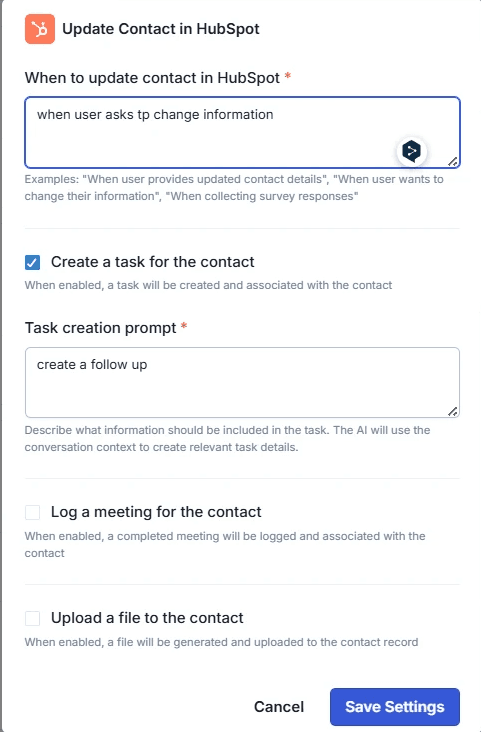
AI-Generated HubSpot Task Creation

Create AI-powered sales tasks from conversation context

When creating a task for a HubSpot contact, you write a task creation prompt describing what the AI should include. Wonderchat uses the actual conversation context to generate relevant, specific task details automatically — giving sales reps the right information without any manual summarizing.

AI writes task details

Grounded in conversation context

Tasks assigned to the right contact
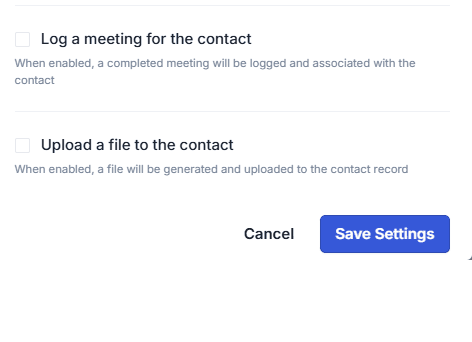
Log Meetings and Upload Files

Log meetings and upload files to HubSpot contacts

Beyond tasks, the Update Contact tool supports logging completed meetings associated with a contact and uploading files directly to the contact record in HubSpot. Every relevant touchpoint and document stays attached to the right contact without switching between tools.

Log completed meetings automatically

Upload files to contact records

All activity in one place

Testimonials

Businesses with successful customer service start

with Wonderchat

Testimonials

Businesses with successful customer service start

with Wonderchat

Industry Grade Compliance

Wonderchat is GDPR compliant and AICPA SOC 2 Certified.

Industry Grade Compliance

Wonderchat is GDPR compliant and AICPA SOC 2 Certified.

FAQ

How does Wonderchat sync chatbot leads to HubSpot?

Wonderchat includes three native HubSpot tools built directly into the chatbot editor: Sync Contacts, Get Contact, and Update Contact. These tools let you automatically create or update HubSpot contact records from chatbot conversations, retrieve existing contact data by email, and push updates back to HubSpot — all without manual data entry or third-party middleware.

Do I need to use Zapier or a third-party connector to sync leads?

No. Wonderchat's HubSpot integration is native — it is built directly into the chatbot editor under the Tools section. You do not need Zapier, Make, or any other middleware to sync contacts, retrieve records, or update contact information in HubSpot.

Can I choose which contact fields get synced to HubSpot?

Yes. The Sync Contacts tool lets you select exactly which contact information fields are captured from the chatbot conversation and pushed to HubSpot. The Get Contact tool similarly lets you choose to retrieve all available fields or only the specific fields your workflow requires. Custom fields are also supported.

Can the chatbot create tasks in HubSpot for my sales team?

Yes. The Update Contact tool includes a task creation feature. You write a prompt describing what information should be included in the task, and Wonderchat's AI uses the actual conversation context to generate the relevant task details automatically. The task is then created and associated with the correct HubSpot contact.

Can Wonderchat log meetings or upload files to HubSpot contact records?

Yes. Within the Update Contact tool, you can enable an option to log a completed meeting associated with a contact in HubSpot. There is also an option to upload a file directly to the contact record. Both actions are triggered from within the chatbot workflow.

FAQ

How does Wonderchat sync chatbot leads to HubSpot?

Wonderchat includes three native HubSpot tools built directly into the chatbot editor: Sync Contacts, Get Contact, and Update Contact. These tools let you automatically create or update HubSpot contact records from chatbot conversations, retrieve existing contact data by email, and push updates back to HubSpot — all without manual data entry or third-party middleware.

Do I need to use Zapier or a third-party connector to sync leads?

No. Wonderchat's HubSpot integration is native — it is built directly into the chatbot editor under the Tools section. You do not need Zapier, Make, or any other middleware to sync contacts, retrieve records, or update contact information in HubSpot.

Can I choose which contact fields get synced to HubSpot?

Yes. The Sync Contacts tool lets you select exactly which contact information fields are captured from the chatbot conversation and pushed to HubSpot. The Get Contact tool similarly lets you choose to retrieve all available fields or only the specific fields your workflow requires. Custom fields are also supported.

Can the chatbot create tasks in HubSpot for my sales team?

Yes. The Update Contact tool includes a task creation feature. You write a prompt describing what information should be included in the task, and Wonderchat's AI uses the actual conversation context to generate the relevant task details automatically. The task is then created and associated with the correct HubSpot contact.

Can Wonderchat log meetings or upload files to HubSpot contact records?

Yes. Within the Update Contact tool, you can enable an option to log a completed meeting associated with a contact in HubSpot. There is also an option to upload a file directly to the contact record. Both actions are triggered from within the chatbot workflow.

40+ Languages

Starts at $0.02/message

Available 24/7

AI agents that service your customers end-to-end

14-day free trial. No credit card required

40+ Languages

Starts at $0.02/message

Available 24/7

Sync Your Chatbot Leads to HubSpot

14-day free trial. No credit card required