Train Your AI Chatbot on Zendesk

Sync your Zendesk knowledge base and support ticket history to train an AI chatbot that resolves inquiries with precision. A few clicks — no manual uploads required.

Trusted by businesses worldwide

Easy 5 minute set-up

How Wonderchat Works
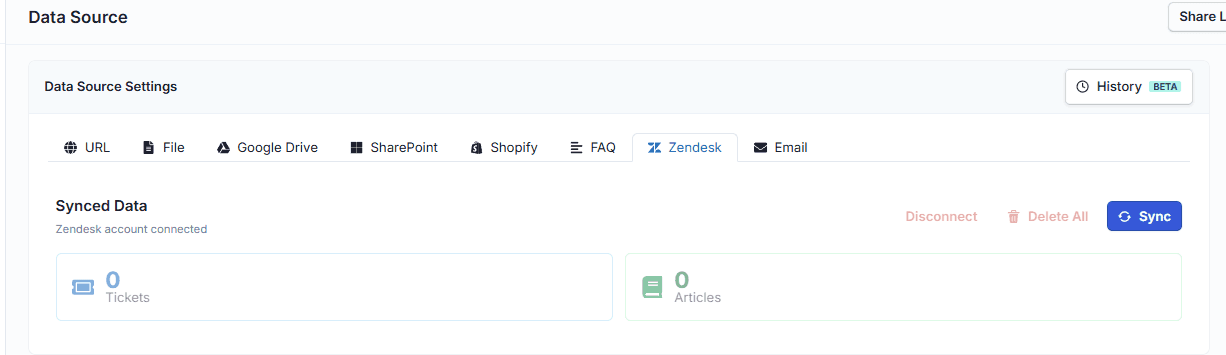
Sync Zendesk Knowledge Base

Train on your Zendesk knowledge base articles

Navigate to the Data Source tab inside your chatbot, select Zendesk, and click Sync. Wonderchat pulls in your published knowledge base articles and uses them as the AI's foundation — no file exports, no copy-pasting, no manual uploads.

One-click knowledge base sync

No manual file exports

Articles become AI training data
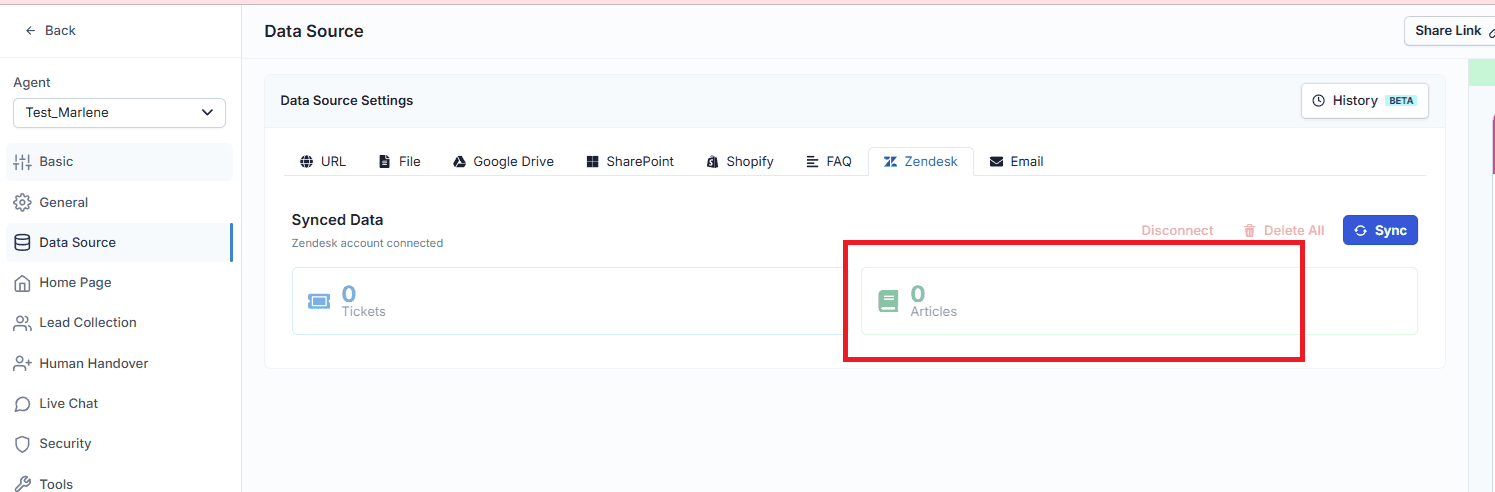
Train on Zendesk Ticket History

Learn from past Zendesk support tickets

Beyond articles, Wonderchat ingests your historical support ticket replies — the actual answers your team gave to real customers. Choose a custom time range: last 30 days, last year, all tickets, or a specific date range. The AI learns directly from resolved interactions, not generic content.

Sync historical ticket replies

Custom date range selection

Built from real resolutions
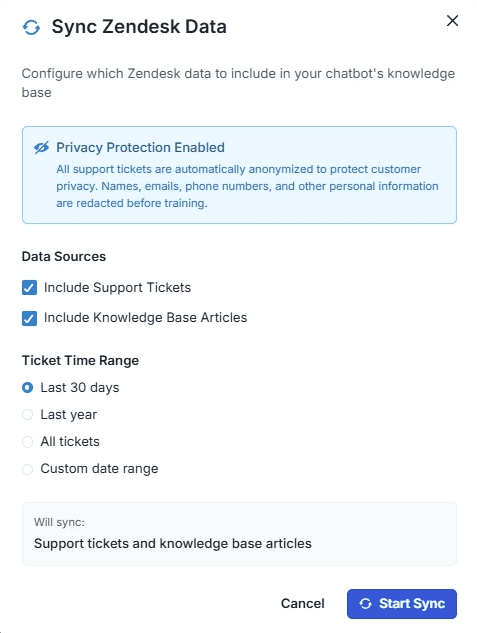
Flexible Sync Controls

Choose exactly what data to sync

Select support tickets, knowledge base articles, or both during each sync. Combine data sources to give the AI the fullest possible picture of how your team handles inquiries. A notification confirms when the sync is complete and the chatbot is ready to test.

Tickets and articles combined

Sync completes in minutes

Instant readiness notification

5-minute set up with our native integration

Set Up Your Live Chat Alternative in Minutes

1

Create your AI chatbot – Pick the perfect AI model fit for your support needs.

2

Train AI with Docs, FAQs & Policies – Upload knowledge base files and site links.

3

Customise Workflows & Escalation Rules – AI handles what it can, and escalates what it can’t.

4

Monitor & Optimise with Analytics – See where customers get stuck and fine-tune responses.
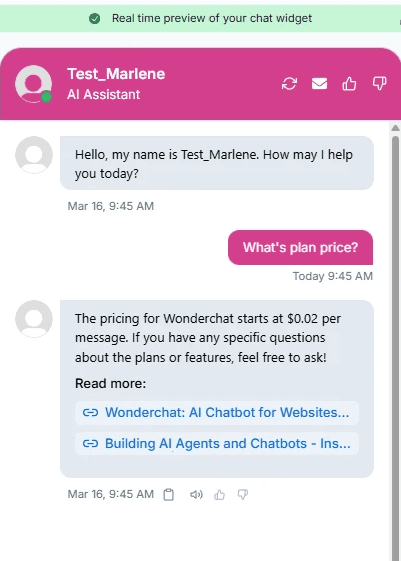
AI That Resolves Not Just Responds

Resolve 80 to 92% of inquiries autonomously

Wonderchat AI agents resolve 80 to 92% of customer inquiries without human intervention — verified across enterprise clients. Trained on your Zendesk data, the AI answers with the same accuracy as your team, averaging just 2 messages to fully close a query.

80 to 92% autonomous resolution

Average 2 messages per query

No generic deflection
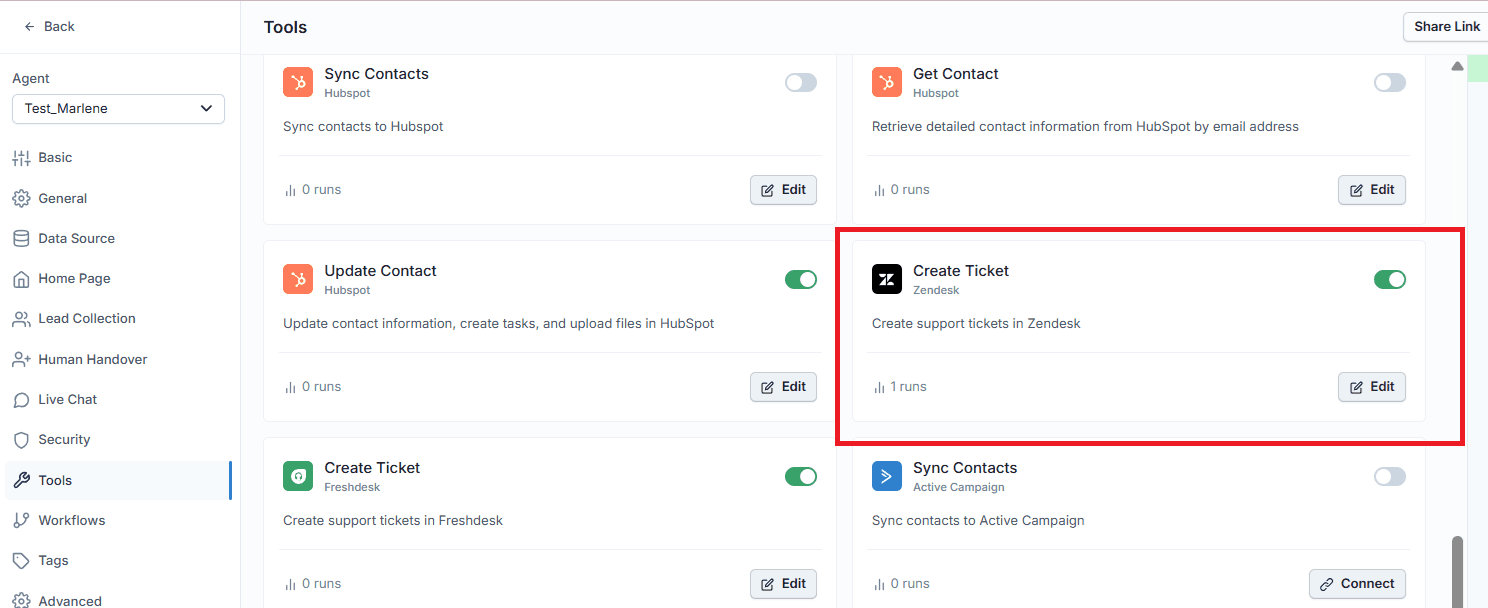
Seamless Zendesk Escalation

Escalate to Zendesk when humans are needed

When the AI reaches its confidence threshold, it creates a ticket directly in Zendesk so your human agents can take over — with full conversation context already attached. The AI handles Tier 1 volume entirely while your team focuses on complex, high-value Tier 2 conversations.

Auto-creates Zendesk tickets

Full context on handoff

Tier 1 handled by AI

Testimonials

Businesses with successful customer service start

with Wonderchat

Testimonials

Businesses with successful customer service start

with Wonderchat

Industry Grade Compliance

Wonderchat is GDPR compliant and AICPA SOC 2 Certified.

Industry Grade Compliance

Wonderchat is GDPR compliant and AICPA SOC 2 Certified.

FAQ

How do I train an AI chatbot on my Zendesk data?

Inside Wonderchat, open the chatbot you want to train and navigate to the Data Source tab. If your Zendesk integration is already connected, a Zendesk option will appear. Click it, then click Sync. You can choose to sync support tickets, knowledge base articles, or both — and select a time range for ticket history. The sync takes a couple of minutes, and you receive a notification when it is complete.

Can I train the AI on historical Zendesk support tickets?

Yes. Wonderchat lets you sync previous ticket replies — not just knowledge base articles. You can select a custom time range: last 30 days, last year, all tickets, or a specific date range. This means the AI learns from the actual answers your support team already provided to real customers, rather than relying solely on published documentation.

What Zendesk data can I use to train the chatbot?

You can train the chatbot on two types of Zendesk data: knowledge base articles from your Zendesk Help Centre, and historical support ticket replies. You can sync both simultaneously or choose one at a time. This gives the AI both your structured documentation and the nuanced, context-rich answers from real resolved conversations.

Will the chatbot stay up to date when I add new Zendesk articles?

Yes. You can manually re-sync your Zendesk data source at any time to incorporate new knowledge base articles or recent ticket history. For enterprise clients with frequently changing content, Wonderchat also supports weekly automatic crawling to ensure the AI's knowledge never drifts behind your actual support documentation.

Does Wonderchat replace Zendesk or work alongside it?

Wonderchat works as an AI layer on top of your existing Zendesk setup — it does not replace it. The AI handles Tier 1 inquiries autonomously, and when a conversation needs a human agent, Wonderchat creates a ticket directly in Zendesk with full conversation context attached. Your team continues working in Zendesk for Tier 2 and above.

FAQ

How do I train an AI chatbot on my Zendesk data?

Inside Wonderchat, open the chatbot you want to train and navigate to the Data Source tab. If your Zendesk integration is already connected, a Zendesk option will appear. Click it, then click Sync. You can choose to sync support tickets, knowledge base articles, or both — and select a time range for ticket history. The sync takes a couple of minutes, and you receive a notification when it is complete.

Can I train the AI on historical Zendesk support tickets?

Yes. Wonderchat lets you sync previous ticket replies — not just knowledge base articles. You can select a custom time range: last 30 days, last year, all tickets, or a specific date range. This means the AI learns from the actual answers your support team already provided to real customers, rather than relying solely on published documentation.

What Zendesk data can I use to train the chatbot?

You can train the chatbot on two types of Zendesk data: knowledge base articles from your Zendesk Help Centre, and historical support ticket replies. You can sync both simultaneously or choose one at a time. This gives the AI both your structured documentation and the nuanced, context-rich answers from real resolved conversations.

Will the chatbot stay up to date when I add new Zendesk articles?

Yes. You can manually re-sync your Zendesk data source at any time to incorporate new knowledge base articles or recent ticket history. For enterprise clients with frequently changing content, Wonderchat also supports weekly automatic crawling to ensure the AI's knowledge never drifts behind your actual support documentation.

Does Wonderchat replace Zendesk or work alongside it?

Wonderchat works as an AI layer on top of your existing Zendesk setup — it does not replace it. The AI handles Tier 1 inquiries autonomously, and when a conversation needs a human agent, Wonderchat creates a ticket directly in Zendesk with full conversation context attached. Your team continues working in Zendesk for Tier 2 and above.

40+ Languages

Starts at $0.02/message

Available 24/7

AI agents that service your customers end-to-end

14-day free trial. No credit card required

40+ Languages

Starts at $0.02/message

Available 24/7

Train Your AI Chatbot on Zendesk

14-day free trial. No credit card required