Zendesk AI Chatbot Integration Made Simple

Connect Zendesk in one click and train your AI on real ticket history. Wonderchat resolves Tier 1 inquiries autonomously and creates tickets for seamless human handover.

Trusted by businesses worldwide

Easy 5 minute set-up

How Wonderchat Works
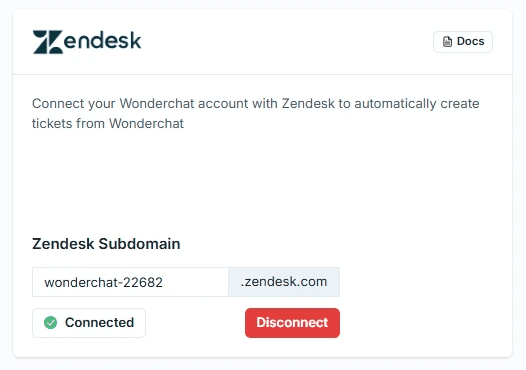
Zendesk AI Chatbot Integration

Connect Zendesk with one click, no coding

Go to Settings, select Integrations, enter your Zendesk domain, and click Connect. A new tab opens for Zendesk authorization — allow the connection and your status instantly updates to Connected. The entire setup requires no developer involvement and no changes to your existing Zendesk configuration.

Domain entry and one click

Instant Connected status

No developer needed
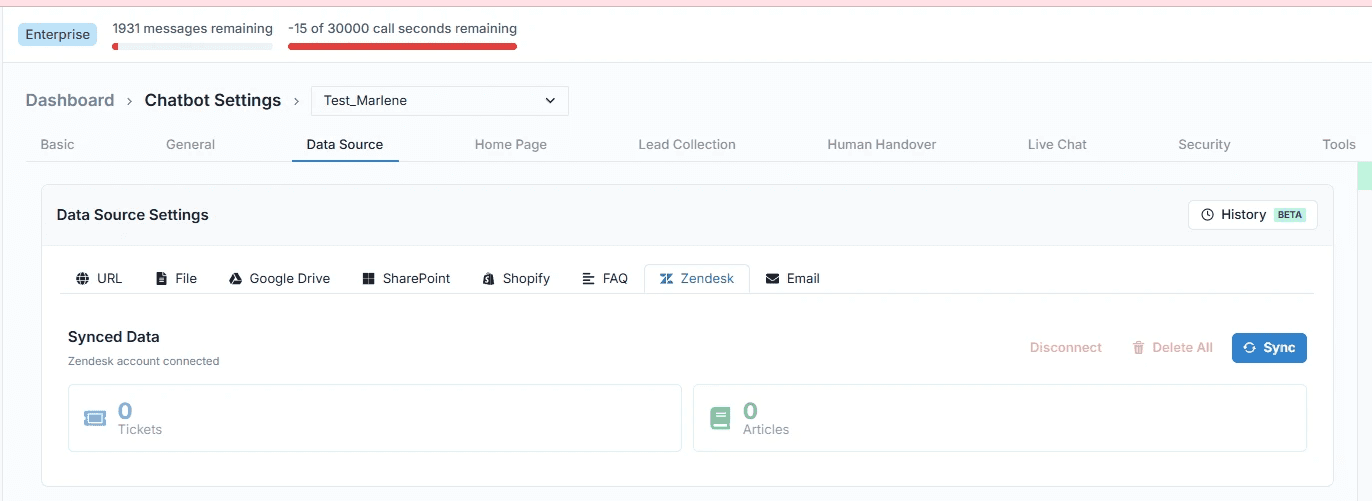
Train Chatbot on Zendesk Tickets

Turn your ticket history into AI knowledge

Inside the Agents tab, select your chatbot, go to Edit, and find the Data Source section. Choose the Zendesk crawl option and click Sync. Wonderchat ingests your entire ticket history, turning past resolutions into future answers — so the AI responds the same way your experienced agents would.

Syncs full ticket history

Past resolutions become answers

Knowledge base always current
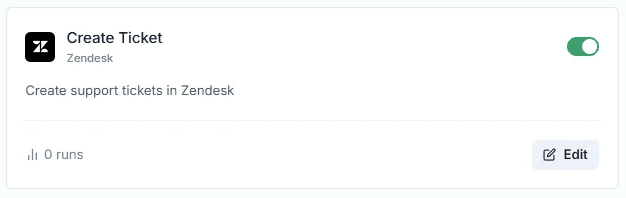
Create Zendesk Tickets from Chatbot

Escalate to Zendesk automatically with full context

Under Tools, scroll to Zendesk and enable automatic ticket creation. Configure the exact trigger — a form submission or a custom prompt — so tickets are only created when the right conditions are met. Every ticket arrives in Zendesk with complete conversation context, so human agents start informed, not from scratch.

Configurable escalation triggers

Full context on every ticket

Zero manual data entry

5-minute set up with our native integration

Set Up Your Live Chat Alternative in Minutes

1

Create your AI chatbot – Pick the perfect AI model fit for your support needs.

2

Train AI with Docs, FAQs & Policies – Upload knowledge base files and site links.

3

Customise Workflows & Escalation Rules – AI handles what it can, and escalates what it can’t.

4

Monitor & Optimise with Analytics – See where customers get stuck and fine-tune responses.
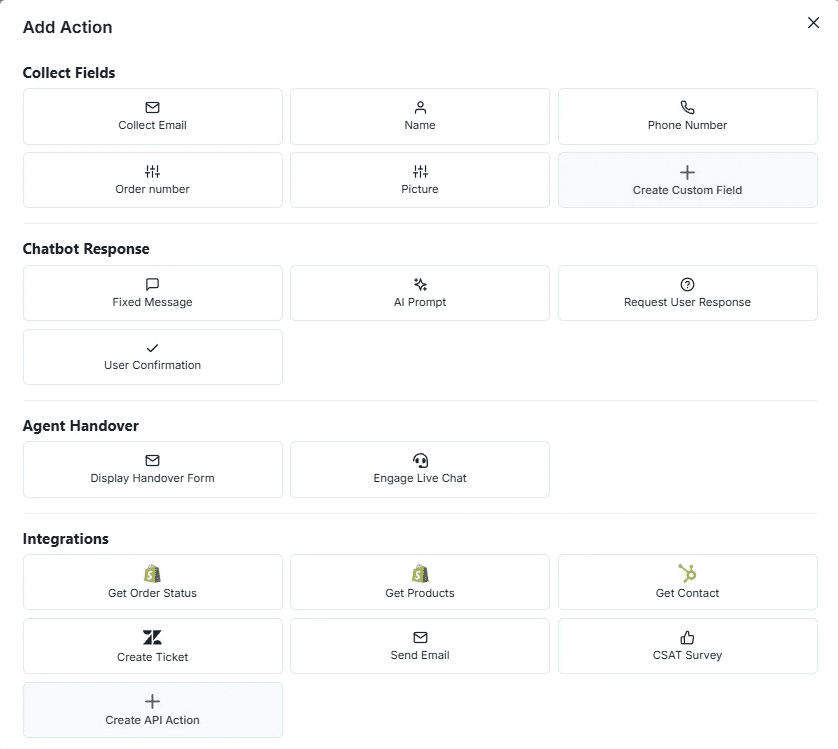
Automate Zendesk Ticket Workflows

Build multi-step workflows that feed Zendesk

In the Workflows builder, add a Zendesk action to any conversation flow. Collect the customer's name, email, and even a photo of a damaged product through structured steps — then automatically create a Zendesk ticket with all of that information attached. Complex support scenarios are handled end-to-end without human intervention.

Multi-step data collection

Conditional workflow logic

Structured tickets auto-created

Testimonials

Businesses with successful customer service start

with Wonderchat

Testimonials

Businesses with successful customer service start

with Wonderchat

Industry Grade Compliance

Wonderchat is GDPR compliant and AICPA SOC 2 Certified.

Industry Grade Compliance

Wonderchat is GDPR compliant and AICPA SOC 2 Certified.

FAQ

How does Wonderchat integrate with Zendesk?

The connection takes just a few steps: go to Settings, select Integrations, enter your Zendesk domain, and click Connect. A Zendesk authorization tab opens — allow the connection and the status updates to Connected immediately. No coding, no API configuration, and no changes to your existing Zendesk setup are required.

Can the AI chatbot train on my existing Zendesk tickets?

Yes. Once connected, navigate to your chatbot in the Agents tab, go to Edit, and select the Zendesk data source option under Data Sources. Clicking Sync pulls your entire ticket history into Wonderchat's knowledge base. The AI learns from your past resolutions so it can handle the same types of inquiries autonomously going forward.

Will the Zendesk AI chatbot automatically create support tickets?

Yes. Under the Tools section, you can enable automatic Zendesk ticket creation and configure exactly when it triggers — for example, when a customer submits a form or when a specific prompt is detected. Tickets are created with full conversation context already attached, so your agents have everything they need before they even open the case.

Can I use Zendesk ticket creation inside automated workflows?

Yes. In the Workflows builder, Zendesk is available as a native action. You can build multi-step flows that collect structured information from the customer — name, email, images, or other details — before automatically creating a Zendesk ticket with all of that data included. This is particularly useful for complex scenarios like defective product complaints or multi-department escalations.

Does this replace Zendesk or work alongside it?

Wonderchat works alongside Zendesk, not instead of it. The AI handles Tier 1 inquiries autonomously — resolving repetitive questions before they become tickets. When escalation is needed, it creates a ticket in Zendesk with full context. Your team continues using Zendesk exactly as before, while Wonderchat reduces the volume of tickets that reach them.

FAQ

How does Wonderchat integrate with Zendesk?

The connection takes just a few steps: go to Settings, select Integrations, enter your Zendesk domain, and click Connect. A Zendesk authorization tab opens — allow the connection and the status updates to Connected immediately. No coding, no API configuration, and no changes to your existing Zendesk setup are required.

Can the AI chatbot train on my existing Zendesk tickets?

Yes. Once connected, navigate to your chatbot in the Agents tab, go to Edit, and select the Zendesk data source option under Data Sources. Clicking Sync pulls your entire ticket history into Wonderchat's knowledge base. The AI learns from your past resolutions so it can handle the same types of inquiries autonomously going forward.

Will the Zendesk AI chatbot automatically create support tickets?

Yes. Under the Tools section, you can enable automatic Zendesk ticket creation and configure exactly when it triggers — for example, when a customer submits a form or when a specific prompt is detected. Tickets are created with full conversation context already attached, so your agents have everything they need before they even open the case.

Can I use Zendesk ticket creation inside automated workflows?

Yes. In the Workflows builder, Zendesk is available as a native action. You can build multi-step flows that collect structured information from the customer — name, email, images, or other details — before automatically creating a Zendesk ticket with all of that data included. This is particularly useful for complex scenarios like defective product complaints or multi-department escalations.

Does this replace Zendesk or work alongside it?

Wonderchat works alongside Zendesk, not instead of it. The AI handles Tier 1 inquiries autonomously — resolving repetitive questions before they become tickets. When escalation is needed, it creates a ticket in Zendesk with full context. Your team continues using Zendesk exactly as before, while Wonderchat reduces the volume of tickets that reach them.

40+ Languages

Starts at $0.02/message

Available 24/7

AI agents that service your customers end-to-end

14-day free trial. No credit card required

40+ Languages

Starts at $0.02/message

Available 24/7

Start Your Zendesk AI Integration Today

14-day free trial. No credit card required