


07/10/2026
Context Window
A context window is the maximum amount of text an AI model can consider in one request. Measured in tokens, it contains the instructions, conversation, retrieved passages, tool results, and the answer being generated.
What Fills a Context Window?
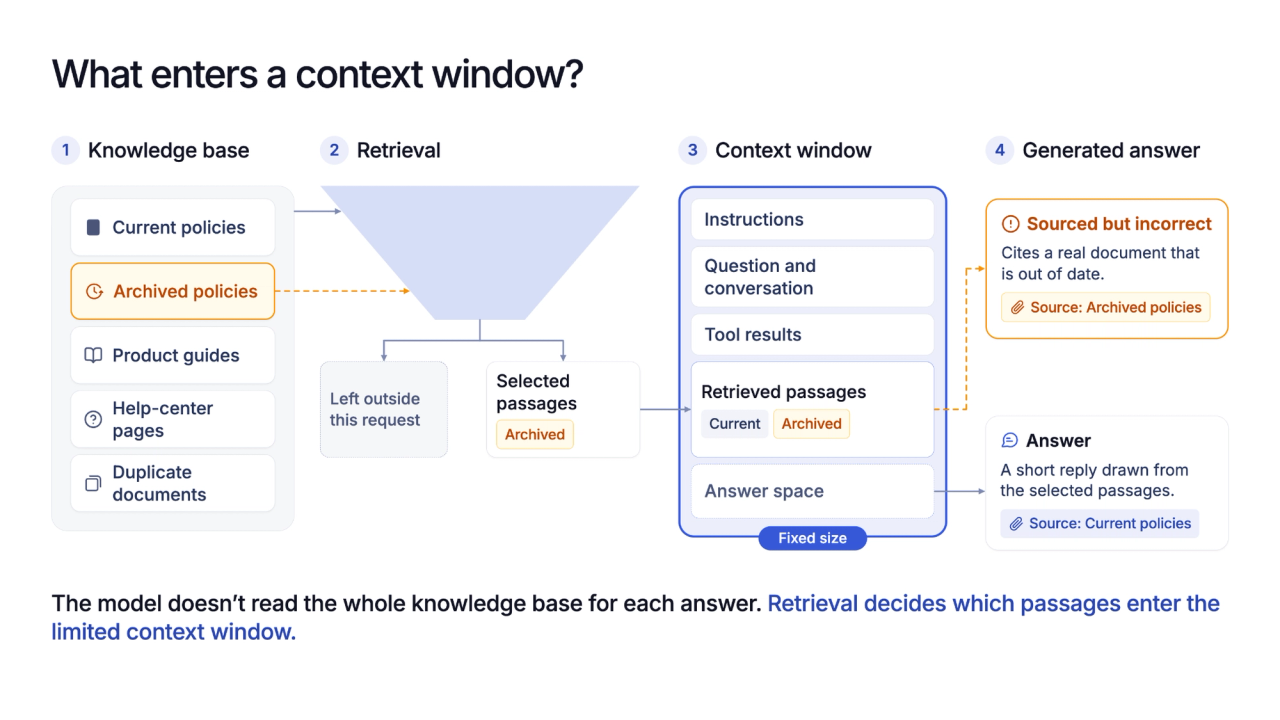
Every part of a request competes for the same limited space. Fixed instructions, the user's question, earlier messages, tool results, and retrieved source passages consume tokens before the model starts writing, while the expected answer also needs room.
In a retrieval-augmented system, the knowledge base stays outside that window. Retrieval searches the indexed documents, ranks relevant chunks, and sends only the selected passages into the model's context. A grounded answer can use those passages, but it cannot use a policy or product detail that retrieval leaves behind.
Context size is therefore a capacity limit, not a promise that every included detail receives equal attention.
Teams that compare RAG chatbots should test what evidence reaches the model instead of choosing from the largest advertised window alone.
How to Test a Context Window
A useful test separates a retrieval failure from a generation failure. The process can be checked without relying on a vendor's accuracy label:
- Measure the full request. The count includes fixed instructions, conversation history, tool output, retrieved chunks, and space reserved for the answer.
- Change the evidence position. The same question is tested against details near the beginning, middle, and end of a long document, then repeated with shorter chunks or fewer retrieved passages.
- Inspect the selected source. If the correct passage is missing, retrieval failed. If it is present but the answer ignores it, context handling or generation needs review.
When details near the end of a document disappear as the request grows, chunking and passage selection should be tested before the model is blamed. A larger window may help, but it doesn't repair a retriever that chose the wrong evidence.
Why a Bigger Knowledge Base Can Produce Worse Answers
A knowledge base and a context window aren't the same thing. Adding documents creates more possible passages, including duplicate, outdated, or conflicting versions, while the model still receives only the passages selected for that request.
The failure seen most often is not invention. It is retrieval pulling an archived policy and answering from it correctly. Wonderchat publishes the method behind the number.
Google's Gemini is a better fit for one-off analysis when most of a long file must remain available in one request. Google's long-context documentation covers direct work with long text, PDFs, audio, and video, while a changing support library still needs retrieval and source controls.
The useful buying question isn't which product accepts the most tokens. It is whether the system consistently selects the right evidence, leaves enough space for the answer, and shows the source when something goes wrong.
Frequently Asked Questions
Does a bigger context window mean better answers?
No. A larger window can hold more material, but irrelevant or conflicting passages can still weaken the answer. Retrieval quality, document structure, source freshness, and the model's use of the selected evidence remain important.
How many tokens is a context window?
The limit varies by model, version, and provider. The current model documentation should state whether input and output share one limit, while the provider's tokenizer shows how a specific request is counted.
What happens when the context window is exceeded?
The system may reject the request, remove older material, summarize it, or shorten the available answer space. The exact behavior depends on the model and application, so teams should test it rather than assume silent truncation.
