


19/10/2026
Help Center
A help center is the customer-facing website where people find answers on their own in how-to articles, policies, and FAQs, grouped by topic, with search and a way to contact support.
What Goes Into a Help Center, and Who Reads It
A help center sits in front of support. Customers search it, open an article, and leave with an answer, or contact support when no article fits.
The articles usually come from a knowledge base. In Zendesk's documentation, the help center is the site you give customers, and the knowledge base is the content inside it.
AI agents now read the same public articles, so every gap in the articles becomes a gap in their answers. In Wonderchat's product data, knowledge bases over 500 pages take a median of 15 days to go live, so a large help center needs a plan for what to connect first.
How to Test Whether Your Help Center Covers Your Tickets
A help center has no single score, but coverage is easy to test with tickets you already have.
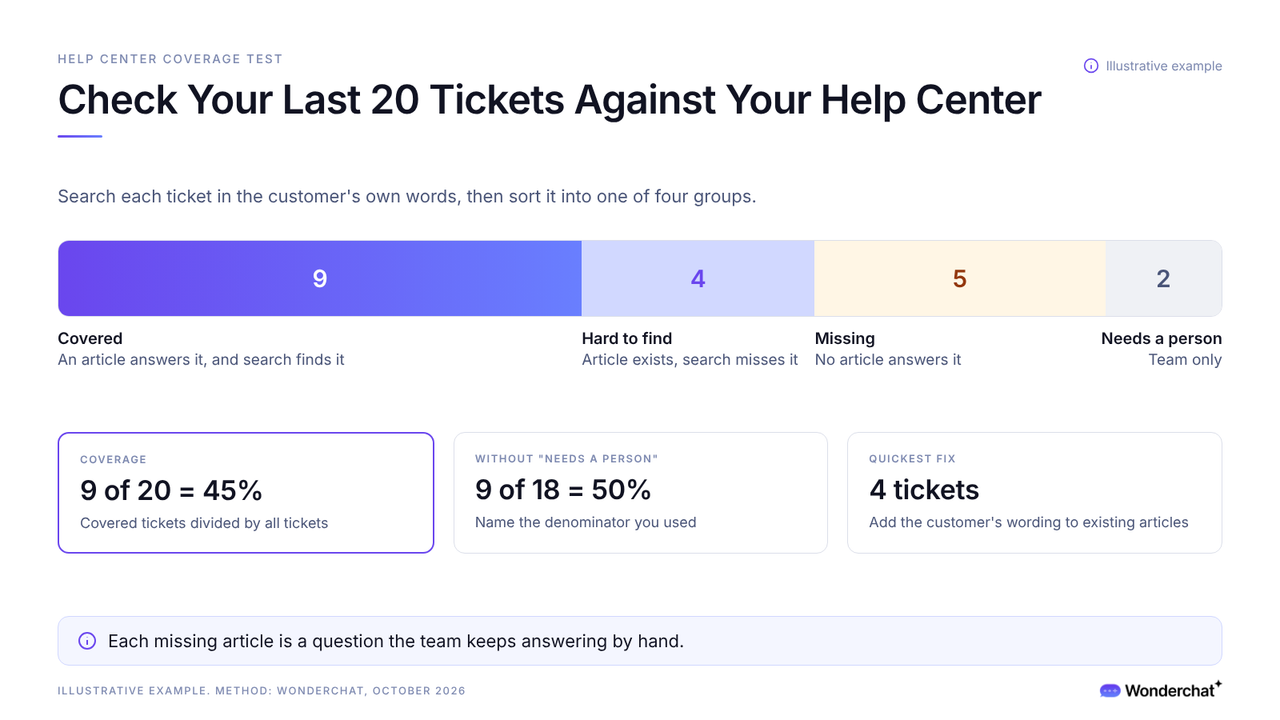
- Take your last 20 tickets.
- Search your help center for each one, using the customer's own words.
- Sort each ticket into one of the four groups below.
- Divide the covered tickets by the total. The result is your coverage, and the rest is your gap list.
- Covered: An article answers it, and search finds it. Link it in replies.
- Hard to find: An article exists, but search misses it. Add the customer's wording.
- Missing: No article answers it. Write it, most repeated first.
- Needs a person: Account-specific or a judgment call. Keep it with the team.
Zendesk's automation potential report runs the same check on 90 days of tickets.
In a hypothetical batch of 20 tickets, 9 are covered, 4 are hard to find, 5 are missing, and 2 need a person, so coverage is 9 of 20, or 45%. Without the 2 that need a person, it's 9 of 18, or 50%, so name your denominator.
Why Help Center Gaps Turn Into Tickets
Every question your help center doesn't answer arrives as a ticket, a chat, or an email.
In a Gartner survey of 5,728 customers (December 2023), only 14% of service issues were fully resolved in self-service. The most common reason self-service failed, in 43% of cases, was that customers couldn't find content relevant to their issue.
For a small team, each missing article is a question someone keeps answering by hand.
Wonderchat answers from a team's own help center and shows the source on every reply.
Help Center vs Knowledge Base vs Help Desk
Vendors blur the terms, and Help Scout calls one product a knowledge base or help center.
- Knowledge base: the articles themselves, sometimes internal and for the team only.
- Help center: the customer-facing site that publishes them, with search and a contact path.
- Help desk: the team, process, and software that answer and track support requests.
The bigger mistake is judging a help center by its size. A help center is only as good as what it leaves out, and the gaps only show when you check it against real tickets.
Frequently Asked Questions
What is another word for help center?
Support center and support site are common alternatives. A knowledge base is close but narrower, because it's the set of articles a help center publishes, and it can be internal.
How do you know what your help center is missing?
Check your recent tickets against it, searching in each customer's own words. Tickets with no matching article are the gap, and the most repeated one is the first article to write.
Can an AI chatbot answer questions from a help center?
Yes. An AI agent connected to your help center finds the relevant article, answers from it, and can link the article it used. When no article covers the question, a good agent says so instead of guessing and offers a person.
