
Quick Summary
Customer service KPIs are the numbers that show whether customers get a right answer quickly: average resolution time, first response time, first contact resolution, ticket volume, cost per resolution, ticket reopens, self-service success rate, agent utilization, number of replies, CSAT, customer effort score and ticket backlog. A small team can start with three (first response time, first contact resolution and CSAT) and add the rest as volume grows.
Want to Deliver Exceptional Customer Service?
Excellent customer service requires skilled agents, efficient processes, and the right tools. But even with all that, you still need to measure how well you are doing, and that’s where Key Performance Indicators (KPIs) come in.
KPIs are measurable values that track your support team's effectiveness. They turn performance into clear metrics, identify areas for improvement, and guide you in delivering consistently exceptional customer experiences.
This Wonderchat article breaks down what KPIs are, why they matter, and the 12 most important KPIs that can help your support team succeed.
Why Listen to Wonderchat?
Wonderchat has helped support teams improve their customer service with AI agents that answer from their own content. Wonderchat's agent answers repeat questions from a team's own docs, so fewer of them reach the ticket queue. Wonderchat analysed 5,848,078 conversations across 14,318 businesses between March 2023 and August 2026.
What Are Customer Service KPIs?
Customer service KPIs (Key Performance Indicators) are measurable metrics that help you track how effective your customer support is. They show how well your team is meeting its goals, identify areas that need improvement, and guide you in building strategies to boost both customer satisfaction and service quality.
Why Are Customer Service KPIs Important?
Aligns with Business Goals: Customer service KPIs connect the performance of your support team directly to the broader objectives of the company.
Identifies Team Strengths and Weaknesses: KPIs provide clear, objective data on agent performance to identify training opportunities for those who need support.
Optimizes Resource Allocation: Analyzing KPIs such as Average Resolution Time (ART) and Ticket Volume helps you manage staffing levels and allocate resources effectively.
Drives Continuous Improvement: Consistently tracking performance allows you to use real data to fine-tune processes, address weak points, and boost overall efficiency.
12 Customer Service KPIs to Track For Better Support
1. Average Resolution Time
Average Resolution Time (ART) measures how long it takes your team to fully resolve a customer’s issue, from the moment a ticket is opened until it’s closed.
For example, if a customer contacts support about exchanging a pair of shoes, ART would include the time it takes to arrange the return, place the new order, and confirm shipping. Keeping ART low is a key goal for most support teams since faster resolutions reduce frustration and boost customer satisfaction.
Here’s the formula to calculate ART:

In Wonderchat, every ticket carries the full chat, so you can trace how each issue was handled from the first message to the close.
2. First Response Time
First Response Time (FRT) measures how long it takes your team to respond to a customer’s first inquiry. It shows how quickly customers receive acknowledgment and initial assistance after reaching out.
For example, if a customer submits a support ticket about a billing issue at 2:00 PM and receives a reply from your team at 2:10 PM, the FRT is 10 minutes. A lower FRT means that your team responds to customer queries almost immediately.
Here’s the formula to calculate FRT:

Wonderchat’s AI agents deliver instant replies to common questions, ensuring customers receive immediate acknowledgment. In practice, this can reduce FRT to just a few seconds for routine inquiries.
3. First Contact Resolution
First Contact Resolution (FCR) measures the frequency at which a customer's problem is completely resolved during their initial interaction. The goal is to resolve the issue on the spot without the customer needing to follow up or be transferred to another agent.
For example, if a customer contacts your support team because they can’t log into their account, and the agent verifies their identity, resets the password, and confirms access within the same chat, that counts as first contact resolution.
First Contact Resolution is a key way to know the efficiency of your support team and how good the overall customer experience is.
Here’s how to calculate FCR:

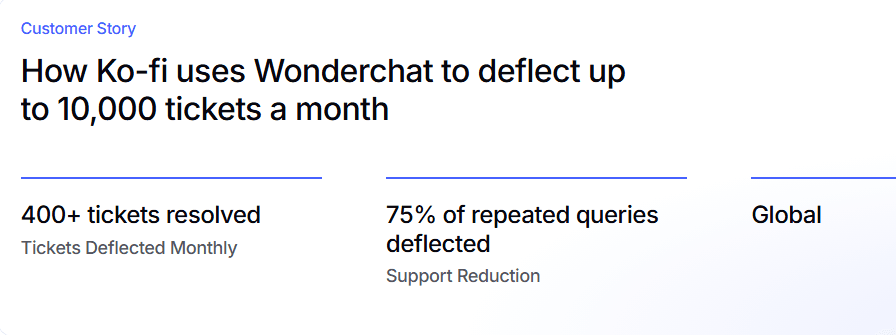
Wonderchat's agent answers common questions from your own docs, and about 75% of evaluated conversations are resolved without a person.
4. Ticket Volume
Ticket Volume simply counts the total number of customer inquiries your team receives over a specific period.
This metric is important for understanding the workload of your support team. It helps you spot trends, like a spike in questions after a new product launch, and allows you to plan more effectively to meet customer demand.
For example, if your team uses Zendesk, you might experience a spike in ticket volume after a product launch. Zendesk’s reporting tools would help your team spot these spikes right away, so you can adjust and handle the increased demand without delays.
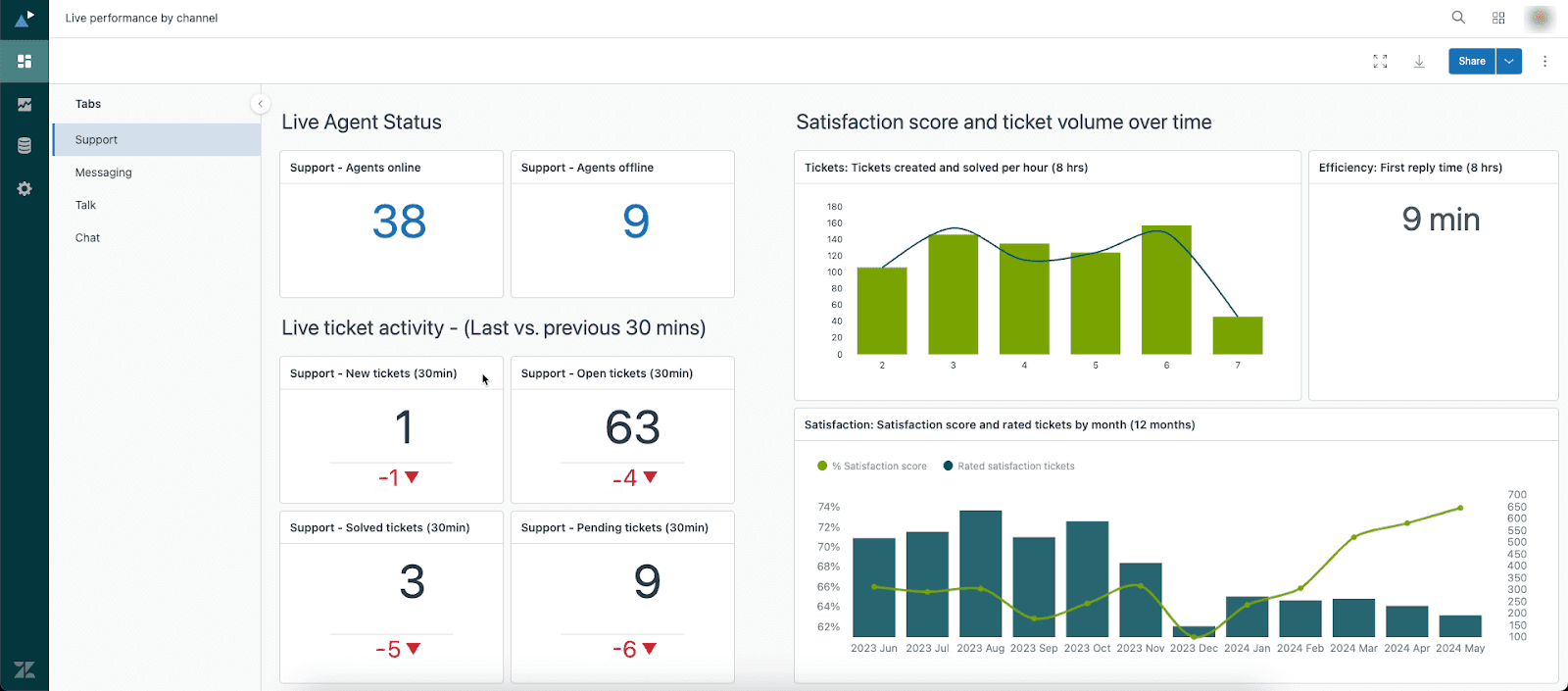
If your ticket volume is high, it might be time to engage an AI agent. With Wonderchat, the agent answers the same questions your team gets over and over, and hands over with the whole conversation when no page covers one.

5. Cost Per Resolution
Cost Per Resolution is a financial metric that calculates the average cost to solve a single customer problem.
For example, if a customer asks about their shipping status, the cost is low because it only takes a few minutes to handle. But if another customer needs help fixing a technical issue that requires an agent to spend 45 minutes troubleshooting, the cost of that resolution is much higher.
Here’s how to calculate cost per resolution:
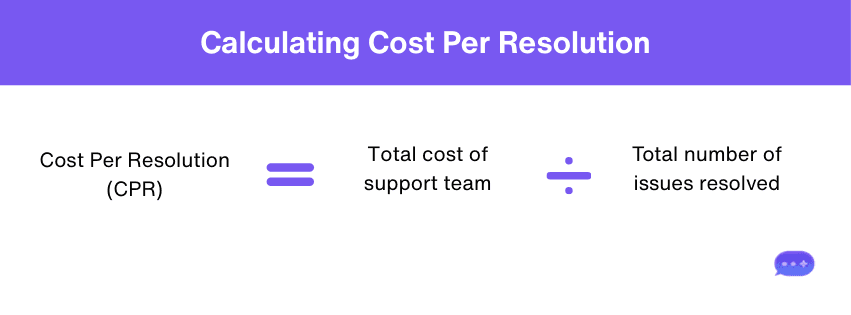
Teams can lower CPR by using Wonderchat’s AI agent to handle common questions like order policies, account questions, or product FAQs. Wonderchat's AI agent pulls information from sources such as URLs, PDFs, and your help center to deliver answers with the source shown on every reply.
6. Ticket Reopens
Ticket Reopens tracks how often an agent has to reopen a support ticket they thought was already closed. This usually happens when the problem wasn’t fully resolved the first time, forcing the customer to get back in touch.
For example, a customer reports that their refrigerator isn’t cooling, and the support team arranges a repair. A few days later, the same customer reopens the ticket because their refrigerator still isn’t cooling as it should. That counts as a reopen. Platforms like Freshdesk allow you to filter and track reopened tickets directly, helping managers see when issues are resurfacing.
A high number of reopens is a red flag that your team may be providing incomplete solutions or closing tickets prematurely. Keeping this number low shows that your support is not just fast but also effective.
7. Self-service Success Rate
Self-service Success Rate measures how often customers resolve their issues using online resources, such as an FAQ page, knowledge base, or chatbots. It shows the effectiveness of your self-service tools in eliminating the need for live agent support.
For example, if a customer runs into a Wi-Fi connectivity problem and solves it by following a troubleshooting guide on your website, that counts as a successful self-service. Tracking this metric helps you see which resources are working and where you need to improve.
You can raise this metric with Wonderchat's AI customer service agent, which answers from your own docs without any code. It answers from your website, help center, PDFs and other files, and shows the source on every reply. When no page covers a question, it says so instead of guessing and offers a person.
8. Agent Utilization Rate
The Agent Utilization Rate is a metric that shows the percentage of time your customer service agents are actively engaged in productive tasks.
This includes responding to emails or working on tickets, compared to their total paid time. It's a useful way to see how efficiently your team is working and whether they have the right amount of workload.
For example, if a customer support agent spends 30 minutes on active customer calls and 10 minutes on administrative tasks in a 1-hour shift, their utilization rate would be 50%.
Here’s how to calculate it:

As you monitor this metric, you can identify areas where agents might be spending too much time on non-customer-facing tasks and optimize workflows to increase active support time.
If your Agent Utilization Rate shows your team is working at full capacity, it might be time to introduce automation. Wonderchat's agent answers the repetitive questions from your docs while your team focuses on the complex ones.
9. Number of Replies
The Number of Replies counts how many messages or interactions it takes for an agent to fully resolve a customer's issue. While some complex problems naturally require more back-and-forth, a consistently high number of replies on simple tickets can be a red flag.
Say a patient contacts a healthcare provider about a billing question. The customer agent sends a reply with initial details, but the patient needs further clarification, requiring an additional reply. By tracking the Number of Replies, the provider can identify cases that require more back-and-forth and improve how clear its first responses are.
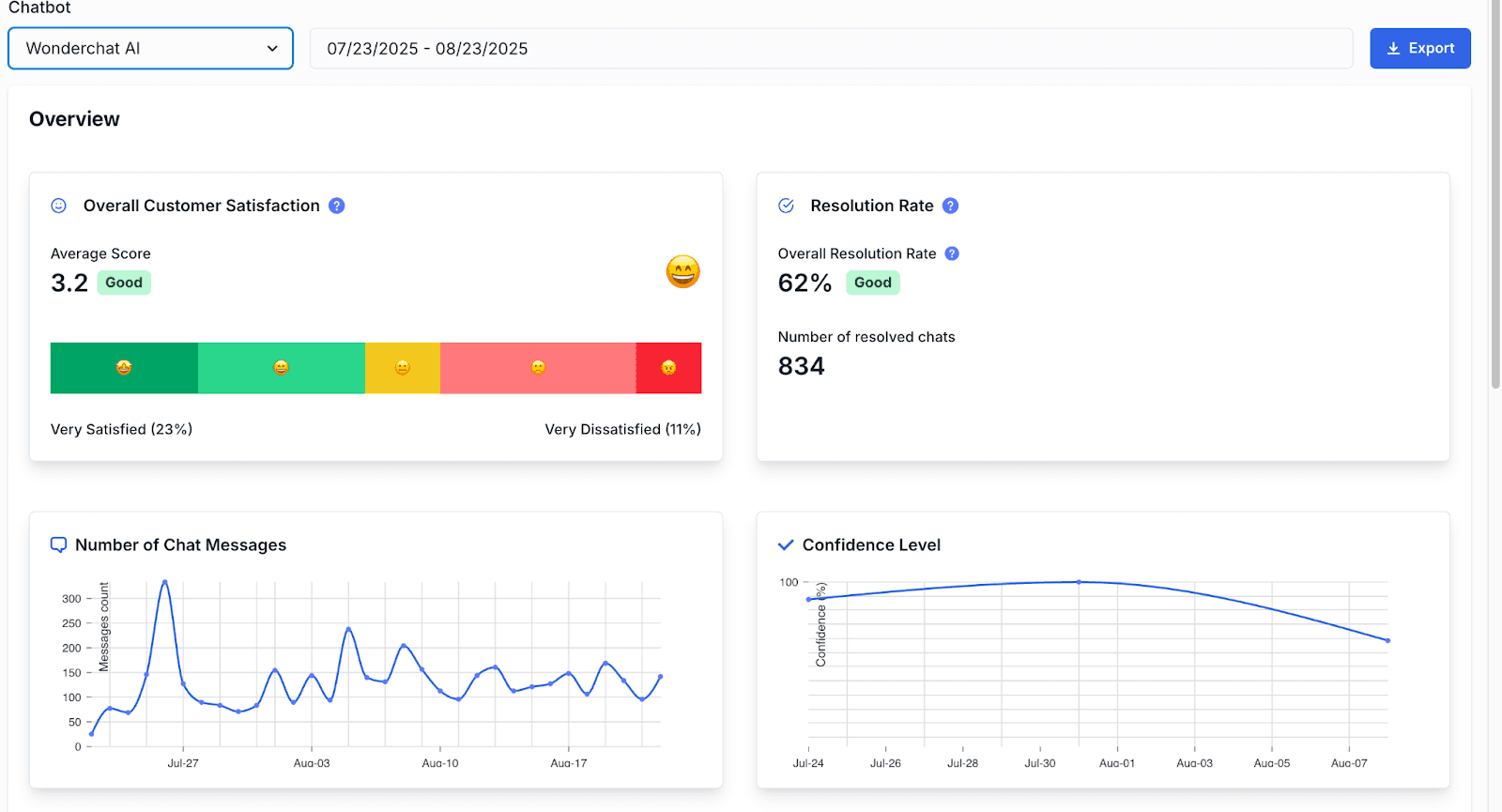
On Wonderchat's analytics dashboard, which comes with the Basic plan, the number of replies shows as the average number of messages in each chat session.
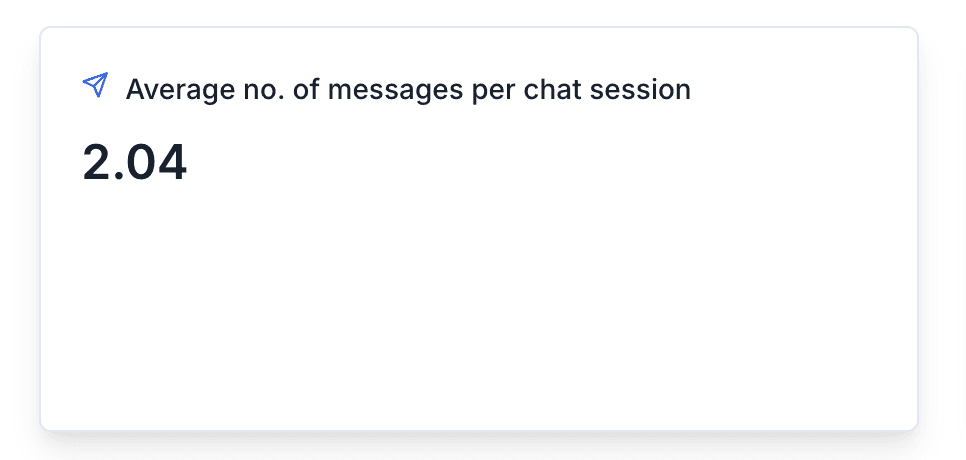
Teams relying only on human agents may see much longer threads for simple queries. For example, platforms like Zendesk calculate the number of replies by focusing on the number of agent replies per ticket. This shifts the perspective from the customer’s experience to the agent’s workload.

While that helps measure team effort, it can sometimes overlook how many interactions the customer actually experienced. For instance, a ticket might show only two “agent replies,” but if the customer had to send six follow-up messages in between, the experience feels much longer and less efficient.
10. Customer Satisfaction (CSAT) Score
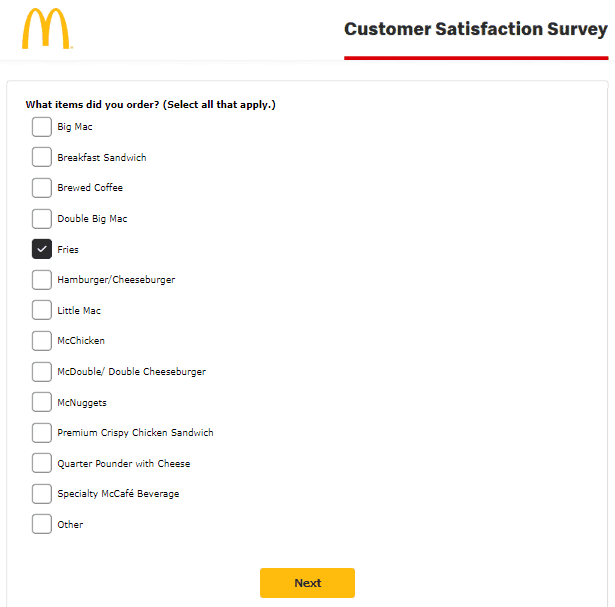
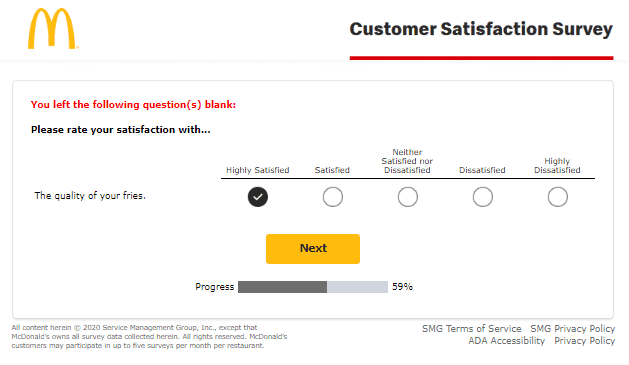
Customer Satisfaction Score (CSAT) measures how happy customers are with your product, service, or support interaction. It’s captured through a quick survey after an interaction, asking customers to rate their experience on a scale, often from “very dissatisfied” to “very satisfied.”
For example, a hotel chain like Marriott can send guests a survey right after checkout asking, "How satisfied were you with your stay?” If the guest gives a 9 out of 10, that score becomes part of Marriott’s overall CSAT, helping the chain see how each property is performing.
In Wonderchat, the analytics dashboard, from the Basic plan, shows how conversations went, and the review inbox lists the questions the agent couldn't answer.
Here's a typical CSAT survey example from McDonald's.
11. Customer Effort Score (CES)
Customer Effort Score (CES) measures how easy it is for customers to resolve an issue or complete a service.
It's gathered through a short post-interaction survey asking customers to rate the effort it took, often on a scale of 1 to 5 from "very easy" to "very difficult.” The lower the effort, the better the experience.
Here’s a CES survey example from Hotjar:

Hotjar uses these surveys to ask customers how easy it was to complete different tasks, like setting up a new heatmap or integrating with another tool. If a user finds the process smooth and straightforward, they’ll select “1,” showing that the platform requires minimal effort to use.
12. Ticket Backlog
Ticket Backlog is the total number of unresolved customer issues that are still open and waiting for your team to handle. A growing backlog often signals that ticket volume is more than your team’s capacity.
For example, a home repair service like FixItNow might notice its backlog rising in Zendesk after a surge in service requests during the winter season. By tracking this metric in their support dashboard, they can know when it’s time for additional staffing or better automation.

With Wonderchat, AI agents can instantly handle routine questions, easing the load on your team. When no page covers a question, the agent says so, offers a person and hands over with the whole conversation, as a Wonderchat ticket or into Zendesk or Freshdesk.

Improve Customer Support Experience with Wonderchat
The right KPIs help you track what matters most: faster responses, higher resolution rates, and happier customers. But hitting those targets can be tough without the right support.
Wonderchat's agent answers the routine questions from your own docs, shows the source on every reply, and tells you what your docs can't answer. Every question it couldn't answer lands in the review inbox, so you answer it once and it answers it from then on.
Ready to see what it answers from your own docs? Try Wonderchat for free.

