


14/10/2026
Support Ticket
A support ticket is a record that tracks a customer request from receipt through resolution. It contains the issue, owner, status, and history. A customer sends the request; support software or a team member creates the record.
How a Support Ticket Works
Email, chat, or a request form can create a ticket automatically, while a support rep can open one after a call. A ticketing system stores the record and attaches replies, private notes, assignments, and status changes to it.
A useful working record includes:
- A unique ID and the requester's contact details.
- A subject and description, with screenshots or error logs when relevant.
- An owner, priority, and current status.
- The source channel, timestamps, and history of replies and actions.
Extra fields should help route or resolve the issue, rather than make customers complete a longer form without a reason.
The owner works the request, marks waiting periods, and records the solution before closure. Status names and reopening rules differ by system; a closed record isn't proof that the customer accepts the answer.
Why Ticket Volume Isn't Customer Demand
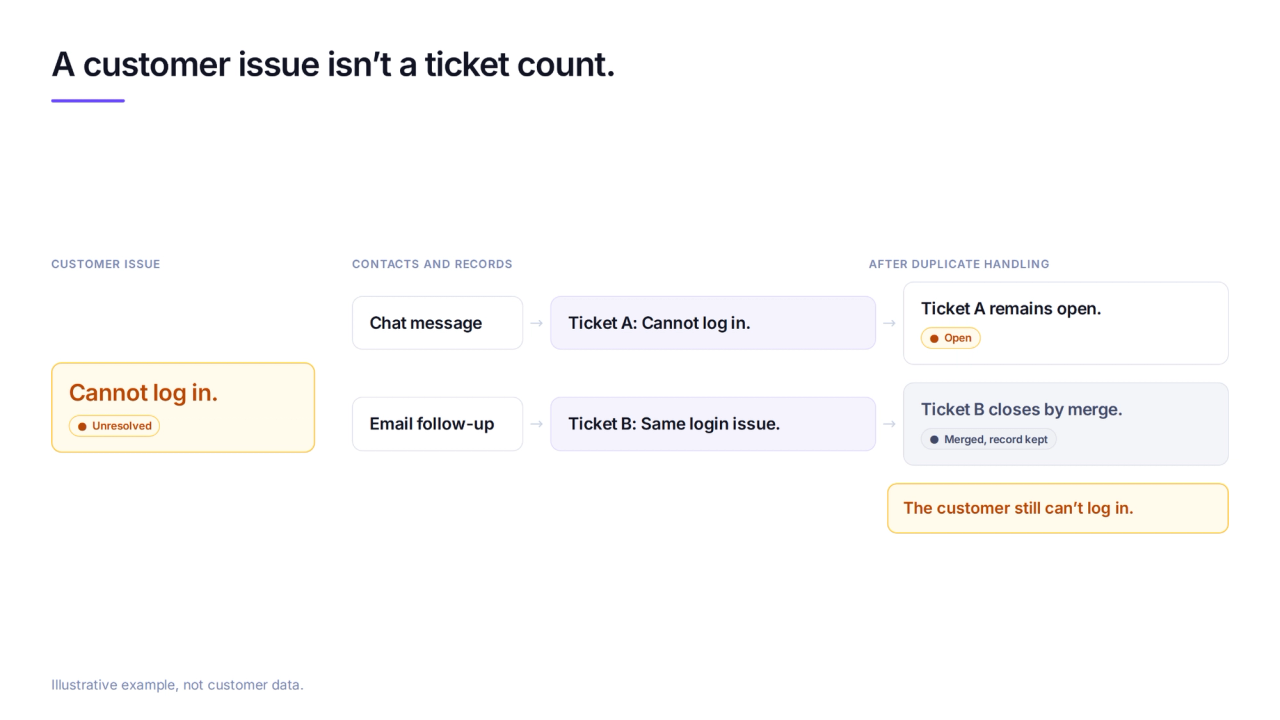
Ticket volume counts filed records, not unique people or distinct problems. Consider a customer who reports a failed login in chat and follows up by email: separate filing rules can create separate tickets for the same unresolved issue.
Merging duplicates reduces the active queue, but it doesn't erase their creation history. Including or excluding tickets closed by merge changes the reported count without changing the customer's problem.
When Does a Team Need Support Tickets?
A billing dispute that passes from support to finance needs a named owner and a visible waiting state. A help desk such as Zendesk is a better fit than an answer-only agent when the task requires ticket assignment and separate statuses for work waiting on customers or another team.
An AI support agent that answers from documentation handles known questions, while unfinished requests may need a person. A conversation reaching a human queue doesn't establish that a separate support ticket exists.
Wonderchat publishes the method behind the number. Across 1,679 AI answers in the helpdesk category, the word 'citations' appeared zero times, and 'ticket' appeared 671 times. Those word counts describe answer-engine language, not solved customer requests.
How to Measure Support Ticket Volume
For the same reporting period, compare created tickets with unique requesters, then inspect whether repeated contacts concern the same issue or different ones.
- Group records by requester and issue. Check duplicate chat and email contacts, not just repeated names.
- Separate newly created records, reopened tickets, and follow-ups to closed cases. Record whether merged tickets remain in the report.
- Review unresolved requests alongside resolution rate, using its stated success rule. A smaller queue alone doesn't show better support.
Comparing tools for repeat support questions requires evidence of completed requests, not just records kept out of the queue.
Frequently Asked Questions
Is a support ticket the same as a conversation?
No. A conversation is the exchange of messages; a support ticket is the record tracking the work. A conversation can raise different issues, while contacts through different channels can create duplicate records for the same issue.
What fields does a support ticket need?
A useful support ticket needs an ID, requester, subject, description, owner, status, priority, source channel, and timestamps. Replies and internal actions belong in its history. An order number or error log belongs only when it helps investigate the request.
Does a small team need tickets at all?
Not always. A founder handling requests end-to-end can work from an inbox. Tickets become useful when a refund waits on finance, a bug needs engineering, or another person needs a clear owner, status, and next action.
