


13/11/2026
Auto-Reply
An auto-reply is a message sent automatically when a customer writes in. The message confirms receipt, gives a ticket number, and says when a person will reply, while the answer waits for that person.
In a personal inbox, the same word means an out-of-office message.
What triggers an auto-reply, and what should stop it?
The wording is saved once, like a canned response, and a rule sends it on each new message. Zendesk sends one through a default trigger when a ticket is created, and Help Scout's auto reply answers only the first email in a conversation.
Two filters stop it from misfiring:
- Repeat limit: one reply per sender per window, which RFC 3834 (2004), the email standard for automatic replies, recommends
- Machine check: no reply to a message whose Auto-Submitted header marks it as automatic
For example, a good one reads "Thanks for writing in (ticket #4821). A teammate replies within 4 business hours. Reply to this email to add screenshots."
Wonderchat's AI agent answers email as well as website chat, from the content a team connects, so an email question can be answered in the first reply.
Which tests catch a bad auto-reply before customers do?
- Promise test: send one email and one chat message, in and out of hours. One acknowledgment should arrive with a number and a reply time the team met last month. That time becomes the clock the customer holds the team to.
- Repeat test: send three emails from one address within an hour. One auto-reply should come back. Three in a row read as spam.
- Loop test: write in from an address with an out-of-office switched on. Each side should reply once and no new ticket should open. Two auto-replies can answer each other until a teammate turns one off, a mail loop Zendesk documents.
Why does the promised reply time matter?
The auto-reply sets the expectation the real reply is judged against. Once it names a time, a slow reply becomes a broken promise.
An auto-reply doesn't count toward first response time. The clock it names keeps running until a person answers.
Ask whether a tool answers the question or only confirms it arrived, and compare customer service software for startups on that point.
Is an AI agent's answer just a smarter auto-reply?
Pylon lists AI agents in its guide to auto-replies. Front keeps the two apart, and its guide treats auto-replies as status messages and leaves the real follow-up to a person.
An auto-reply needs no content. The only thing it can get wrong is the promise.
An AI answer reads the question, can resolve it or get it wrong, and depends on what the team has documented.
Wonderchat's study of 5,848,078 conversations between March 2023 and August 2026 found knowledge bases over 150,000 characters resolved about 74% of conversations and those under 10,000 characters about 61%, a link between size and results that doesn't prove cause. Wonderchat answers from a team's own help center and shows the source on every reply.
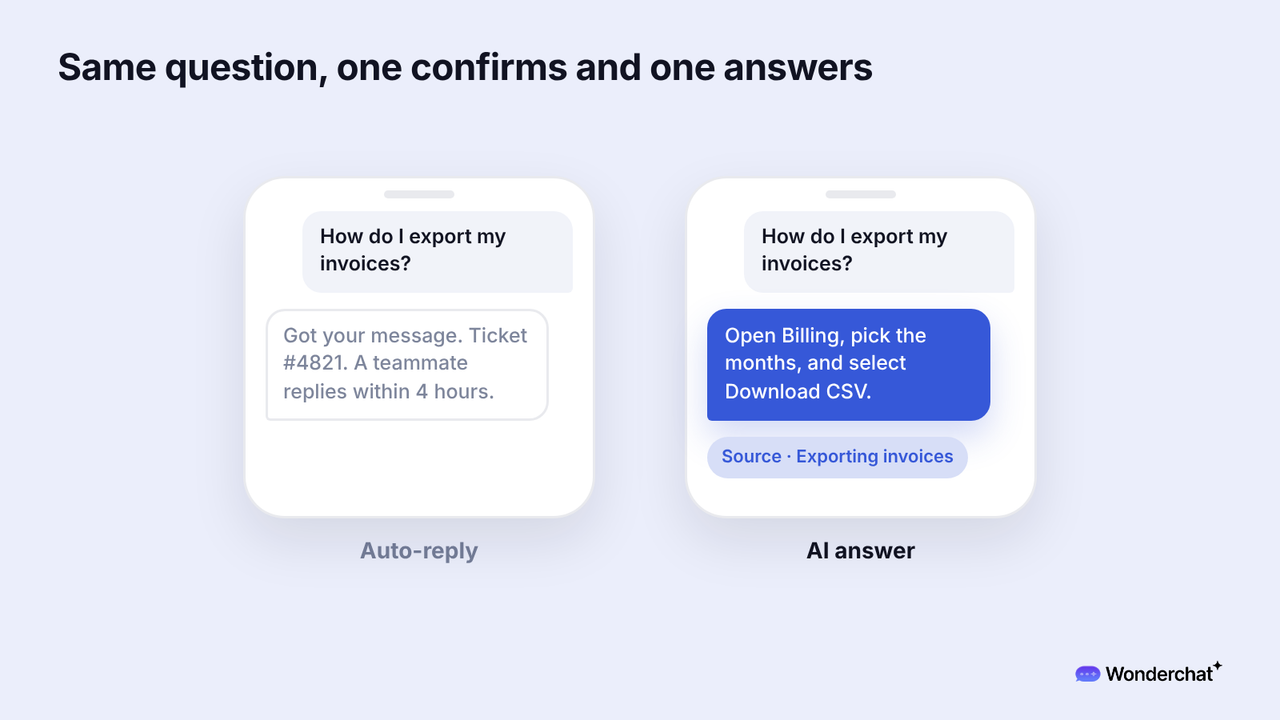
Once an AI agent answers first, keep the acknowledgment for what it hands to a person, where a wait follows. On chat, the acknowledgment is the message a customer sees when nobody is online.
Frequently asked questions
What is a good auto-reply message?
A good auto-reply carries a ticket number, a realistic reply time, links to two or three help articles that match the question, and a line saying it's automated.
Is an auto-reply the same as an out-of-office message?
An out-of-office message comes from one person's inbox while they're away. A support auto-reply comes from the help desk on every new request, at any hour, and carries a ticket number.
How often should an auto-reply go to the same sender?
An auto-reply should go once per sender within a set window. Help Scout's default is once in 24 hours, and RFC 3834 recommends 7 days. A customer who writes three times in an hour gets one acknowledgment.
