


29/10/2026
Asynchronous messaging
Asynchronous messaging is a way for a customer and a support team to exchange messages without both being online at the same time. The customer writes at any time, and the conversation picks up where it left off.
How does asynchronous messaging work?
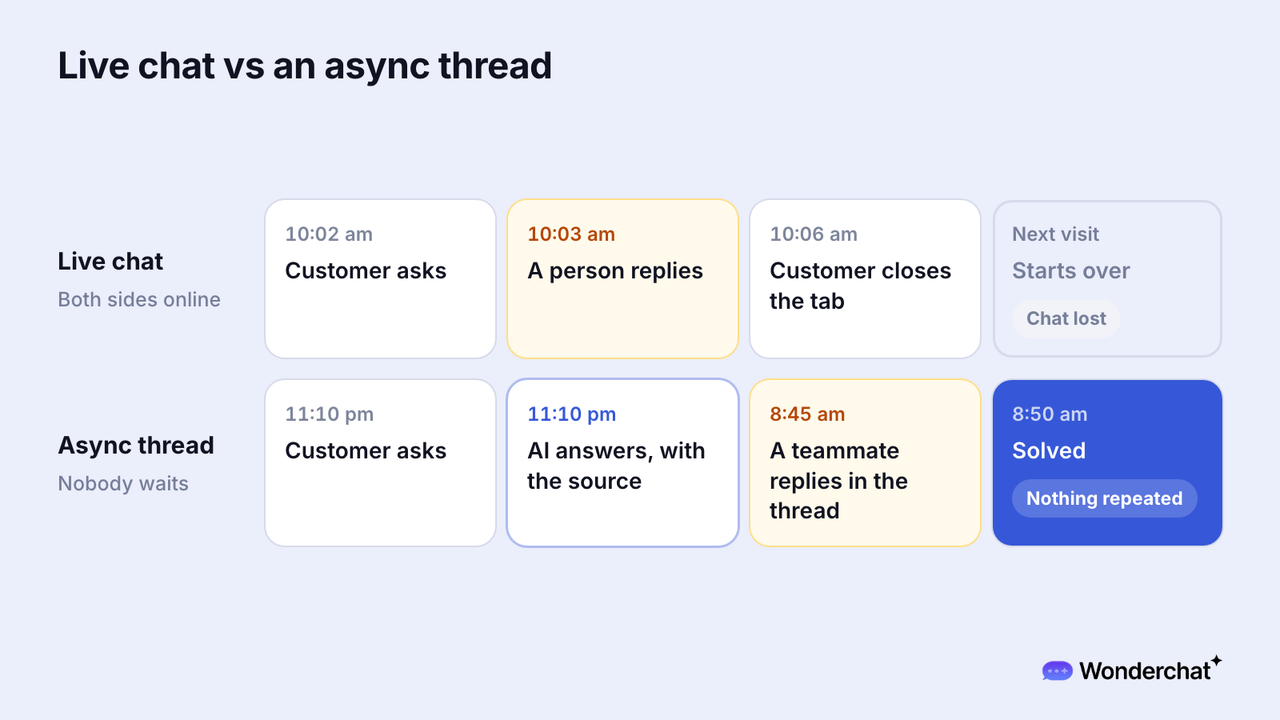
A conversation stays open after the customer closes the tab. An AI agent can answer documented questions at once, and a person replies later in the same thread, so nobody starts over.
Some channels put a clock on that wait. On WhatsApp, a customer's message or call starts a 24-hour timer called a customer service window, and Meta's documentation says that "when the window closes, you can only send pre-approved template messages."
For example, a customer asks at 11:10 pm whether an invoice can be changed. The AI agent answers at once with its source, a teammate checks the invoice and replies in the same thread at 8:45 am, and the question is solved by 8:50 am with nothing repeated.
How do you measure asynchronous support?
Measure the wait across sessions, not inside one.
- First response time: from the first message to the first reply, by the AI agent or a person.
- Requester wait time: how long the customer waits after each message they send.
- Full resolution time: from the first message to the solved answer, across days if needed.
- Unreplied conversations: threads still waiting for any reply.
Keep these numbers apart from live chat, and compare each channel against its own first response time. The two channels make different promises, and Zendesk's messaging metrics guide notes that "messaging doesn't have a direct comparison to dropped chats, as conversations can be resumed later."
Why does asynchronous messaging matter when nobody is online?
Questions keep arriving after the team logs off. With asynchronous messaging and an AI agent that answers from the docs, a documented question gets an answer now and any other question gets a person later, without the customer starting over.
Across Wonderchat's customers, about 75% of evaluated conversations are resolved without a person, and when nobody is online, Wonderchat escalates the conversation to email so the team can follow up.
Wonderchat answers from a team's own help center and shows the source on every reply.
Is asynchronous messaging the same as slow live chat?
No, live chat promises a person right now, while asynchronous messaging promises the conversation won't be lost.
Promising live chat and then replying hours later breaks that promise, so tell customers when a person will reply.
Frequently asked questions
What does asynchronous support mean?
Asynchronous support means a customer and a support team don't need to be online at the same time. The customer leaves a message, gets an answer when one is available, and the thread stays open for a person to reply later.
What is the difference between synchronous and asynchronous messaging?
Synchronous messaging needs both sides present at the same time, as in a phone call or a live chat session. Asynchronous messaging lets each side reply when it can, and the thread keeps the history, as in email or a messaging app.
Is email asynchronous messaging?
Yes, email is asynchronous by nature, because neither side needs to be online when a message is sent. A chat widget can work asynchronously too, when the conversation stays open after the customer leaves.
