


26/09/2026
Escalation and Handoff
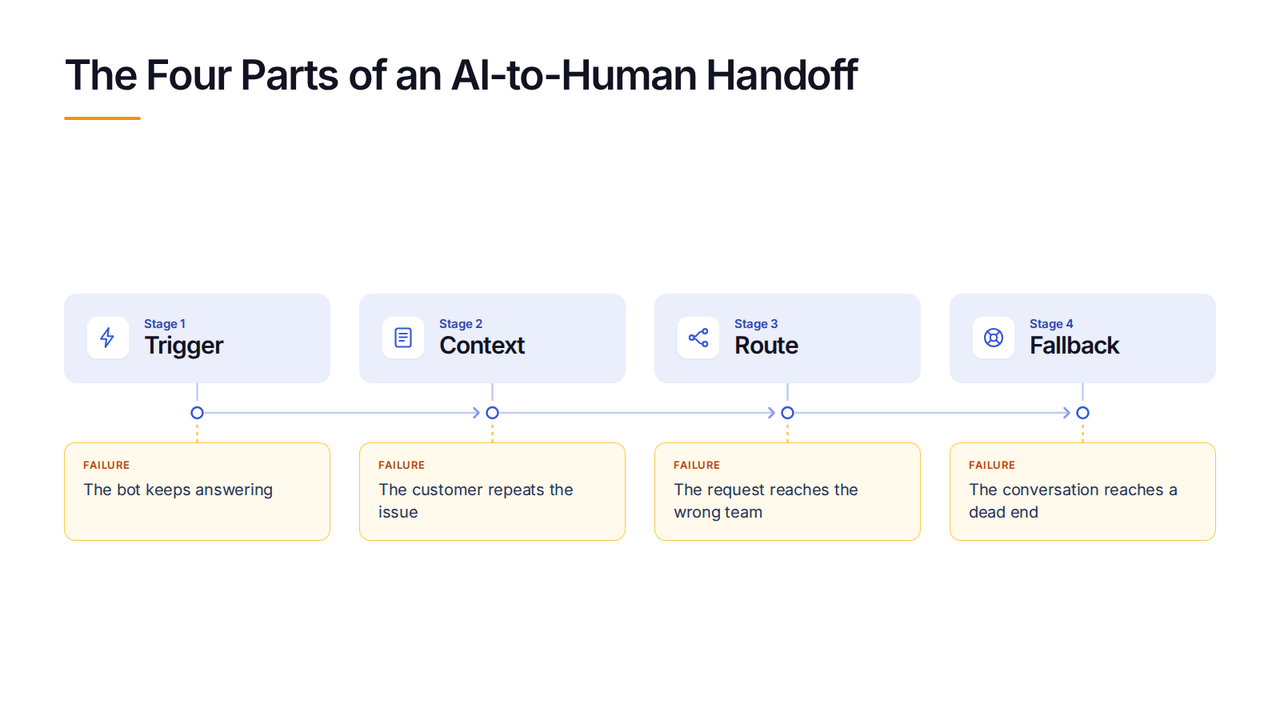
Escalation is the moment an AI agent stops answering and routes the conversation to a human. A working handoff carries four things: the trigger that fires it, the conversation context, the route to the right person, and a fallback when nobody is available.
Escalation and handoff are related, but they are not the same step. Escalation is the decision to stop automation, while the handoff is the transfer that follows, including what the person receives and where the request goes.
Production benchmarks attributed to ClarityArc and summarized by eesel show why this path is a permanent part of AI support. Complex technical troubleshooting records a 15% to 30% deflection rate, while complaints and disputes reach 19% to 34% across vendors and models, so most of these conversations still need another route.
4 Parts of a Working Handoff
Wonderchat treats handoff quality as a four-part test: trigger, context, route, fallback.
1. Trigger: Decide When the AI Must Stop
A trigger may be a direct request for a person, a confidence score below the configured confidence threshold, repeated failed answers, a blocked action, or a rule for sensitive topics. Without a clear trigger, the agent may keep replying when it lacks enough information or permission to continue.
2. Context: Carry the Work Already Done
The receiving person should see the transcript, customer details already collected, the type of request, the steps the AI tried, and the reason for escalation. If the first human reply asks the customer to explain the issue again, the transfer moved the conversation but failed the handoff.
3. Route: Send the Request to the Right Place
Routing chooses the team, queue, channel, or specialist that can act on the request, using details such as topic, language, urgency, or account type. A technically successful transfer still creates delay when a billing dispute lands with sales or a security warning joins a general support queue.
4. Fallback: Plan for an Unavailable Human
A fallback covers closed hours, full queues, failed transfers, and channels where live chat is not available. It may create an owned ticket, collect contact details, or state when the team will reply, but it should never leave the customer waiting in an empty chat.
How to Test an AI Handoff
A polished answer doesn’t show whether the handoff works, so test the moments when the agent should stop and inspect the receiving queue afterward.
- Ask for a human in the first message and check whether the request is honored without extra prompts.
- Submit an unsupported or sensitive question and confirm that the agent stops instead of guessing.
- Repeat a failed request in different words and check whether the trigger catches the loop.
- Run the same cases after hours, then confirm the fallback creates a clear, owned next step.
- Open the receiving inbox and verify that the transcript, customer details, attempted steps, and escalation reason arrived together.
Once the mechanism passes, the AI agents with human handoff comparison shows how products differ by channel, destination, plan, and failure point. A transfer still doesn’t prove the problem was solved, so review resolution rate, repeat contact, time to first human reply, and post-handoff CSAT together.
Frequently Asked Questions
What is escalation in AI customer support?
Escalation is the decision to stop an automated support conversation and move the request to a human, another team, or an owned queue because the AI cannot or should not continue.
How does a chatbot hand off to a human?
A chatbot detects a trigger, packages the conversation context, routes the request to the right destination, and uses a fallback when no person is available.
What information should transfer during a handoff?
The handoff should carry the transcript, customer details, request type, steps already tried, relevant account or order information, and the reason the AI stopped.
