


17/09/2026
Chatbot vs Live Chat
Live chat connects a customer to a human in real time, while a chatbot answers without one. The question isn’t which is better, but which handles the first response, because most support teams use both, and the handoff between them decides the experience.
How Chatbots and Live Chat Divide the Work
A chatbot reads a customer message and produces the next response automatically, using fixed rules, detected intent, retrieved source material, or a combination of these methods. Live chat places the conversation with a human agent, who interprets the request and decides what to say or do next.
Since both can appear inside the same chat window, the interface does not reveal the practical difference. That difference lies in who forms the response, what information or permissions that responder has, and when responsibility changes hands.
Which One Should Handle the First Response?
Consider a customer who writes, “My order arrived damaged, and I need a replacement before Friday.” A chatbot can retrieve the returns policy and collect an order number, but a human may need to approve an exception, check replacement stock, or arrange faster shipping.
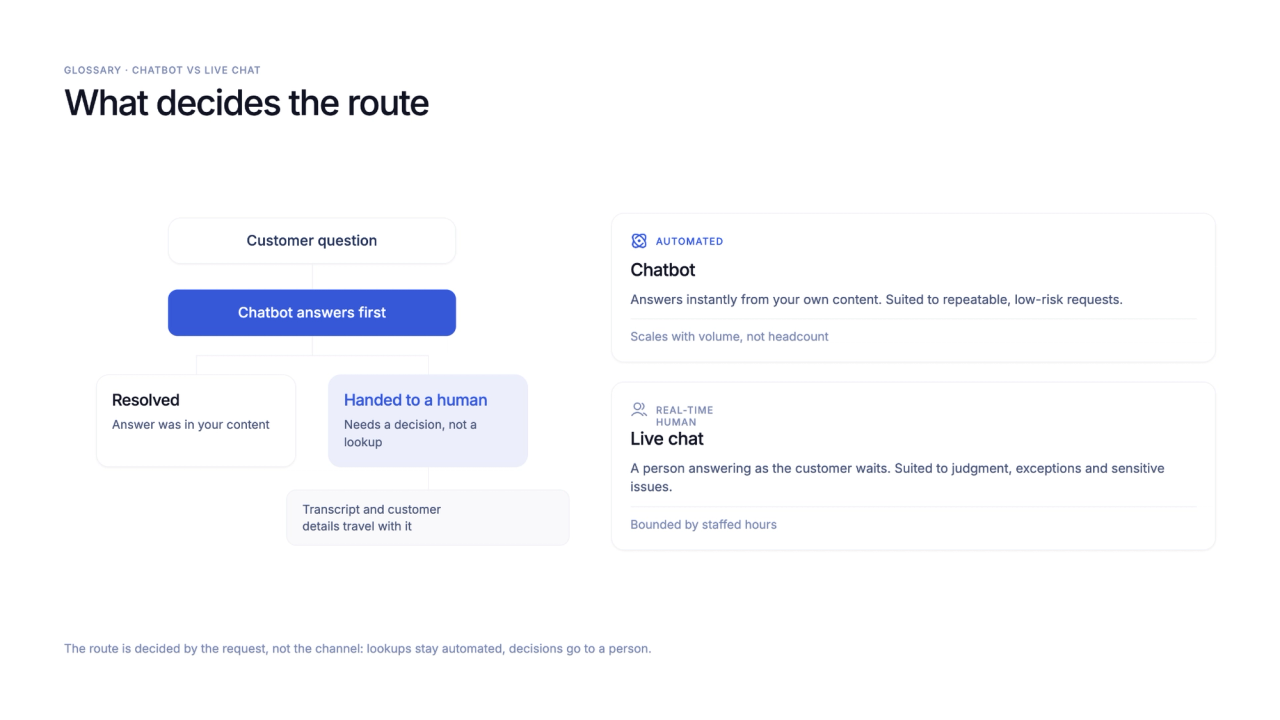
Automation fits the first response when the request is repeatable, the answer exists in approved source material, and any required action falls within the system’s permissions. Live chat should take over when information is missing or conflicting, the request needs judgment or empathy, or the next step requires human approval.
When a chatbot treats every request as an information question, it may return the correct return policy without addressing the damaged order or deadline. The answer sounds relevant, yet the customer’s problem remains unresolved.
What a Useful Handoff Passes to the Human Agent
Once a handoff is triggered, the transcript, identified issue, collected details, attempted steps, and reason for escalation should move with the conversation. Without that context, the customer must repeat the problem while the agent reconstructs work the chatbot has already done.
The chatbot can answer supported questions and prepare the remaining request, leaving judgment, exceptions, and restricted actions with a human agent.
Wonderchat treats chatbot and live chat as one pipeline, judged at the handoff. For a broader comparison of features and use cases, read the full chatbot vs live chat guide.
How to Test Chatbot and Live Chat Together
A product trial should test where automation stops, because routine questions reveal little about the handoff that follows a harder request.
- Ask a common policy question, then request an exception. The chatbot should explain the policy and route the exception without inventing approval.
- Combine a factual question with an account change. The system should answer the supported part and send the restricted action to someone with permission.
- Request a human after several chatbot messages. The agent should receive the transcript and collected details without asking the customer to begin again.
These checks show whether the AI-to-human handoff preserves context and stops automation at the right point.
